Guaranteed delivery
Replaces the weak WordPress mail system with professional SMTP authentication. Your emails arrive where they should, not in spam.
[ Management and productivity ]
Professional SMTP for WordPress. Reliable delivery in five minutes.
Works with WooCommerce
¿Tus correos de WordPress desaparecen en el spam? La función mail() predeterminada de WordPress es un fracaso silencioso. Sin autenticación SMTP adecuada, tus notificaciones de contacto, confirmaciones de registro y alertas de cliente simplemente se pierden. Los servidores receptores no confían en WordPress. Tu reputación sufre. Tus clientes nunca reciben lo que necesitan.
[B] Easy WP Mailer resuelve esto de forma definitiva. Reemplaza el sistema de correo débil de WordPress con autenticación SMTP profesional en menos de cinco minutos. Funciona con cualquier proveedor: Gmail, Outlook, SendGrid, Mailgun, Amazon SES o el servidor SMTP de tu hosting. No necesitas código. No necesitas terminal. Solo configura, prueba y disfruta de entrega de correos que realmente funciona.
Diseñado para agencias que gestionan múltiples sitios, desarrolladores que exigen confiabilidad, y propietarios de negocios que no pueden permitirse perder un solo correo. Ya sea que ejecutes una tienda WooCommerce que necesita confirmaciones de pedido confiables, un formulario de contacto que debe llegar a tu bandeja de entrada, o un sitio de membresía donde los correos de recuperación de contraseña son críticos, [B] Easy WP Mailer es tu solución.
Construido con seguridad en primer lugar. Sanitización completa de entrada, protección CSRF con nonces, verificación de capacidades, y almacenamiento seguro de credenciales. Compatible con WordPress 6.0+, PHP 8.1+, y totalmente funcional en redes multisitio. Cumple con WCAG 2.2 AA para accesibilidad y sigue cada estándar de seguridad de WordPress.
El modo de depuración integrado captura cada interacción SMTP, cada error de autenticación, cada fallo de conexión. Cuando algo sale mal, tienes un registro completo para diagnosticar exactamente qué pasó. El seguimiento de fallos automático te muestra qué correos no se entregaron. Las herramientas de prueba integradas verifican tu conexión y envían un correo de prueba real antes de confiar en la configuración para producción.
Esto no es un parche temporal. Es la solución definitiva de entrega de correos para WordPress. Configúralo una vez, olvídate de él, y confía en que cada correo llegará donde debe llegar. Tu reputación de remitente mejora. Tus clientes reciben sus mensajes. Tu tranquilidad es completa.
Replaces the weak WordPress mail system with professional SMTP authentication. Your emails arrive where they should, not in spam.
Full sanitisation, CSRF protection, capability checks, secure credential storage. Meets every WordPress and GDPR standard.
Built-in debug mode, test tools, failure tracking. You know exactly what works and what does not, without guessing.
No code, no terminal, no complexity. Just fill in the fields, test, and you are done. Even a beginner can do it.
Gmail, Outlook, SendGrid, Mailgun, Amazon SES, your hosting. If it offers SMTP, it works with [B] Easy WP Mailer.
Manage hundreds of sites with independent settings. Perfect for agencies and corporate networks.
A team in the Spanish time zone. Fast answers, practical help, no automatic chatbots.
Order confirmations, shipping notifications, refund alerts. Your customers never miss a critical email about their purchase.
Contact, demo requests, form notifications. Emails reach your inbox without going to spam, without delays.
Registration confirmation, password recovery, profile changes. Your members receive their security emails instantly.
Manage SMTP for dozens or hundreds of client sites with independent settings. One central solution for all of them.
Security alerts, comment notifications, content updates. Every automatic WordPress email is now reliable.
Enrolment confirmations, course reminders, grades. Students and parents receive every important notification without delays.
Upload [B] Easy WP Mailer from Plugins → Add New, or copy the folder to /wp-content/plugins/. Activate it from the WordPress plugins screen.
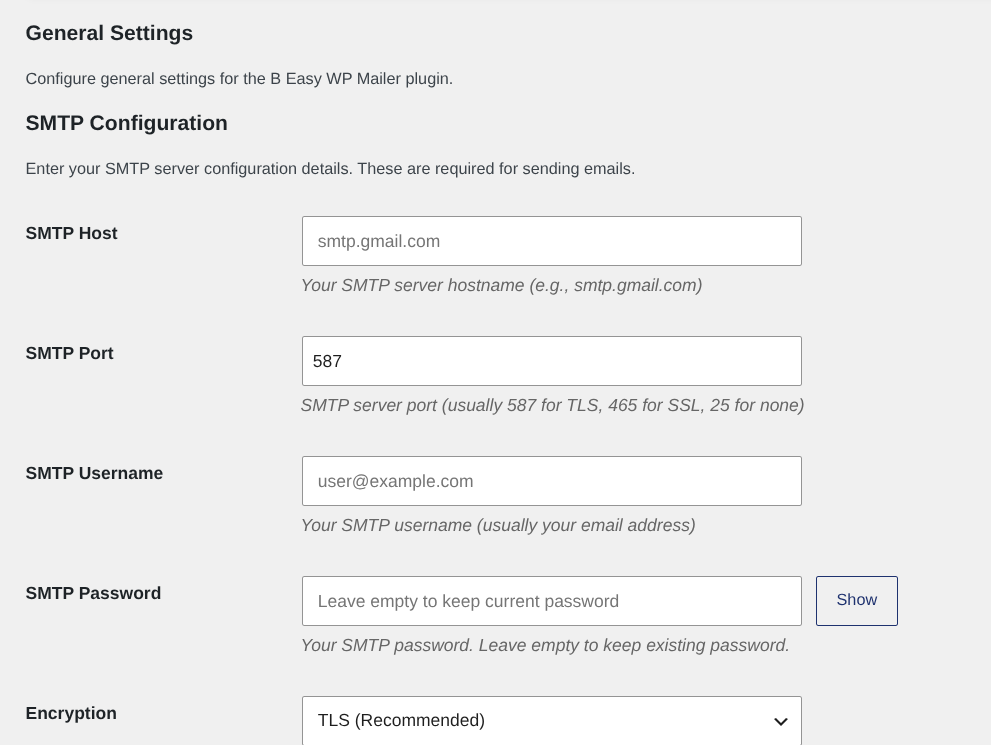
Go to your email provider (Gmail, Outlook, SendGrid, etc.) and get: SMTP server, port, username, password/token and encryption type. Most providers have this information in their documentation.
Fill in the fields: SMTP host, port, user, password, encryption. Customise the sender if you wish. Every field has built-in help.
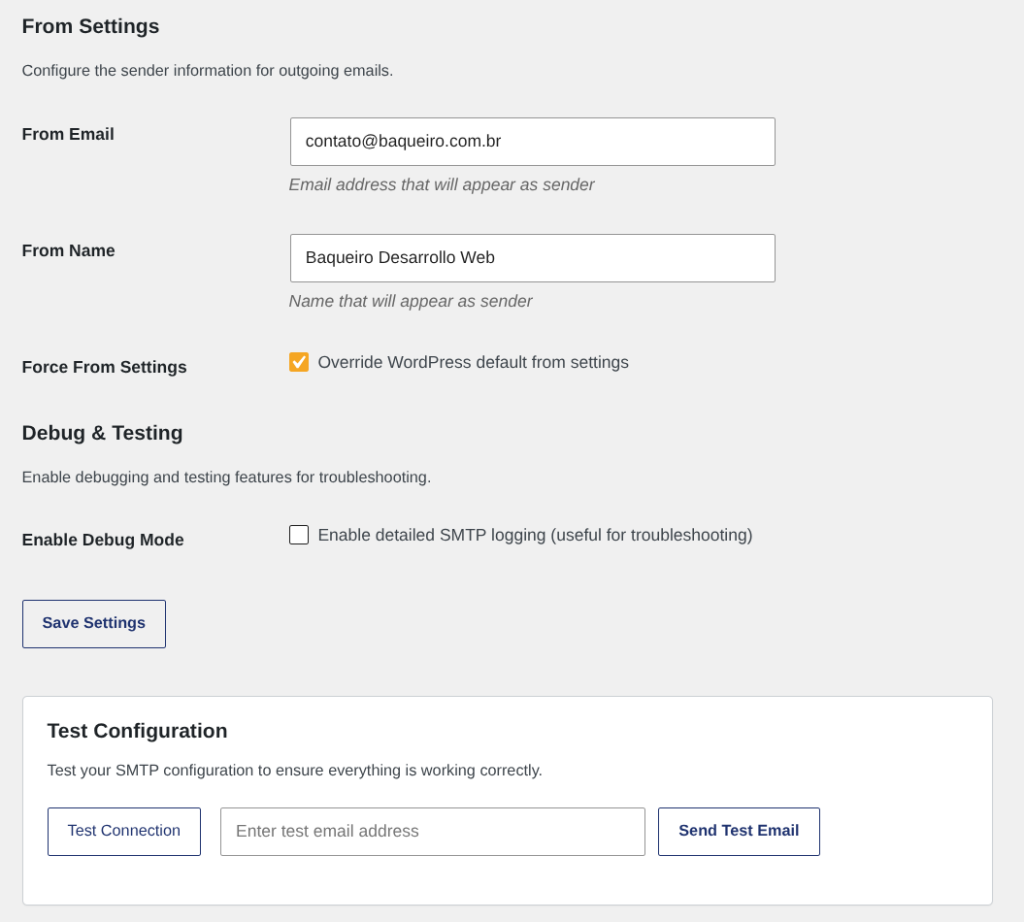
Use the built-in tools: first test the connection (it checks that your SMTP server is reachable), then send a real test email to your inbox. If both pass, you are ready.
Click Save. Every WordPress email is now sent through your SMTP server. Check the failure log now and then. That is all.
Comparison with common alternatives
| Aspect | Easy WP Mailer | Other solutions |
|---|---|---|
| Native SMTP settings | Yes, complete and flexible | Requires an additional plugin or custom code |
| Built-in test tools | Connection test + real email sending | Only manual or external tests |
| Debug mode with SMTP log | Yes, complete and redacted log | Requires external tools or server logs |
| Automatic failure tracking | Yes, history of undelivered emails | No, no tracking |
| Multisite support | Fully compatible, settings per site | Limited or requires manual setup |
| Accessible interface (WCAG 2.2 AA) | Yes, inclusive design | Not always accessible |
| Direct support in Spanish | Yes, team in the Spanish time zone | International or English-language support |
WordPress uses the PHP mail() function by default, which includes no real authentication. Many receiving servers block these emails or mark them as spam because they cannot verify that they really came from you. Authenticated SMTP is the industry standard: it provides real credentials, encryption and a verifiable sender reputation. Without SMTP, your critical emails simply disappear.
[B] Easy WP Mailer works with any standard SMTP server. This includes: Gmail and Google Workspace, Microsoft 365 and Outlook, SendGrid, Mailgun, Amazon SES, Brevo (formerly Sendinblue), your hosting provider's SMTP server and any other SMTP-compatible service. If your email provider offers SMTP access (and most do), this plugin supports it.
TLS (Transport Layer Security) is the modern, recommended encryption method. It is usually used on port 587. SSL (Secure Sockets Layer) is older but still supported by some providers, typically on port 465. TLS is more secure and flexible. Most providers recommend TLS. If you are not sure, start with TLS on port 587; if that does not work, try SSL on port 465.
Every email provider publishes its settings. Common examples: Gmail (smtp.gmail.com, port 587, TLS), Outlook (smtp-mail.outlook.com, port 587, TLS), your hosting (usually mail.yourdomain.com, port 465 or 587). Check your provider's documentation or contact its support. [B] Easy WP Mailer includes a help field on every setting.
SMTP is only one part of deliverability. Other factors: SPF, DKIM and DMARC records set up correctly on your domain, sender reputation with the receiving provider, the content of the email (avoid spam words), a clean distribution list without bounces. [B] Easy WP Mailer handles the SMTP part perfectly. The DNS records are your responsibility. Ask your hosting provider how to set up SPF/DKIM/DMARC.
[B] Easy WP Mailer follows every WordPress security standard. Credentials are stored in the WordPress database (in the options table). They are not shown in the browser or in public logs. The password is encrypted when it is saved and redacted in the debug logs. For maximum security, use an app-specific password (not your main email password) if your provider offers it. Gmail and Microsoft 365 do.
Yes, fully compatible. Each site in your multisite network can have its own independent SMTP settings, or you can use global settings for the whole network. Perfect for agencies that manage several clients.
Many providers (Gmail, Outlook, Microsoft 365) require app-specific passwords instead of your main password when you turn on two-factor authentication. This is normal and safe. Generate an app password in your provider account and use it in [B] Easy WP Mailer. Do not use your main password.
[B] Easy WP Mailer includes two built-in test tools. First, the connection test: it checks that your SMTP server is reachable and accepts your credentials. Second, the test email: it sends a real email to your address to confirm that everything works end to end. Both tools show detailed error messages if something fails.
[ Keep exploring ]
Management and productivity
From calendar to certificate — every event step handled, on your server.
License From €79/year
Management and productivity
Server IP, DNS and network data in your WordPress dashboard
No cost Free
Management and productivity
Real financial control for agencies, in your WordPress
License From €39/year