More organic traffic without more content
A solid internal linking architecture distributes domain authority to the pages that matter most to you, improving their rankings without creating new content or earning external backlinks.

[ SEO and performance ]
Automatic SEO internal linking: set it up once, rank for good
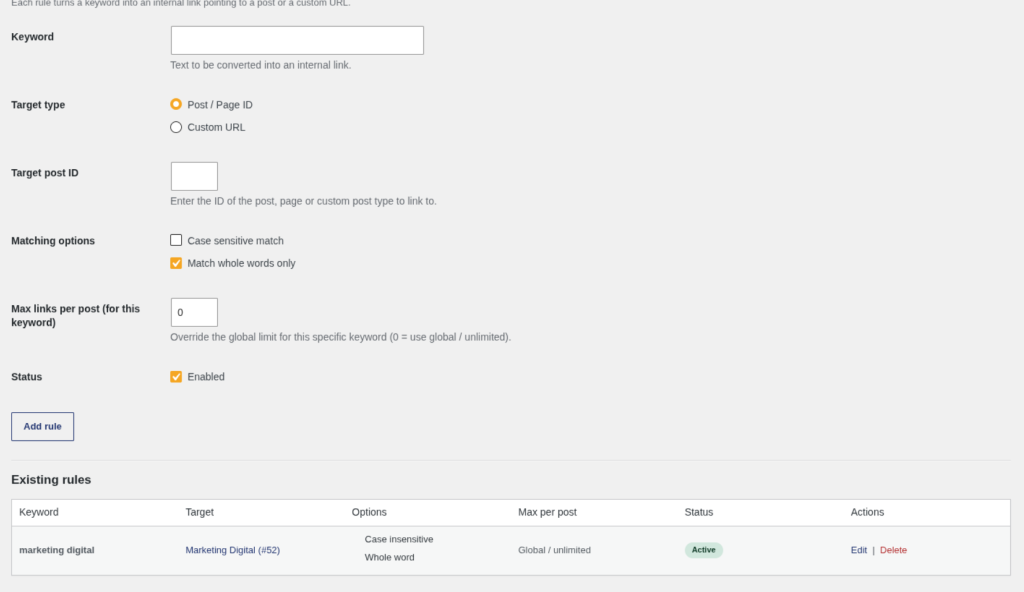
Cada semana que pasa sin una estructura de enlazado interno sólida es tráfico orgánico que se escapa. Google necesita entender la jerarquía de tu sitio para posicionar tus páginas más importantes, y sin enlaces internos coherentes, ese trabajo lo estás dejando incompleto. El problema es que enlazar manualmente cientos de artículos es tedioso, propenso a errores y, en la práctica, nadie lo hace bien de forma consistente. El resultado: silos de contenido desconectados, páginas huérfanas y autoridad de dominio mal distribuida.
[B] Easy Internal SEO Links resuelve este problema de raíz. Defines una vez las reglas —qué palabras clave deben enlazar a qué páginas— y el plugin se encarga de insertar esos enlaces automáticamente en todo tu contenido existente y futuro, sin tocar ni una sola línea de tu base de datos. Los enlaces se generan en tiempo real al renderizar el contenido, lo que significa que puedes ajustar, pausar o eliminar reglas en cualquier momento sin dejar rastro. Sin dependencias externas, sin React, sin Composer: PHP puro y eficiente.
Este plugin está diseñado para editores de medios con grandes volúmenes de artículos, agencias SEO que gestionan múltiples sitios, tiendas WooCommerce que quieren cruzar productos con entradas de blog, y cualquier sitio WordPress que publique contenido de forma regular. Si tienes más de 50 páginas o entradas y no tienes una estrategia de enlazado interno automatizada, estás dejando posicionamiento sobre la mesa cada día. Con la versión premium activa, el índice de similitud extrae automáticamente palabras clave de cada post y la meta box por entrada te permite afinar el enlazado con precisión quirúrgica.
La compatibilidad no es un añadido de última hora: el plugin funciona con WordPress 6.0 o superior, requiere PHP 8.3 y ha sido probado hasta WordPress 6.7. Las actualizaciones se entregan directamente a través del [B] License Manager, apareciendo en la pantalla estándar de actualizaciones de WordPress. La activación de la licencia se realiza desde Herramientas → Licencia en el panel de administración, con soporte para activación, desactivación y verificación de estado en tiempo real. Sin suscripciones opacas ni portales de terceros.
La experiencia del administrador ha sido cuidada en cada detalle: previsualización en vivo del título del post al introducir un ID, encabezados de formulario contextuales, tablas accesibles con atributos scope correctos y formularios de confirmación que no requieren JavaScript inline. La seguridad tampoco se ha descuidado: el seguimiento de clics utiliza nonces vinculados al post específico para evitar la manipulación cruzada de estadísticas, y la limpieza al desinstalar es opcional y controlada. Tus datos permanecen intactos a menos que tú decidas eliminarlos.
El enlazado interno es una de las palancas SEO on-page con mejor ratio esfuerzo/resultado, y sin embargo es sistemáticamente ignorada porque hacerlo bien a mano no escala. Con [B] Easy Internal SEO Links, esa excusa desaparece. Configuras las reglas una vez, defines límites globales y por regla para no saturar el contenido, activas las listas negras para excluir páginas que no deben recibir tráfico interno, y el plugin trabaja en segundo plano mientras tú te concentras en crear contenido. Las estadísticas de clics te muestran qué enlaces funcionan y cuáles necesitan ajuste, cerrando el ciclo de optimización.
No necesitas contratar a un consultor SEO para implementar una estrategia de enlazado interno profesional. Con este plugin, cualquier editor con acceso al panel de WordPress puede construir y mantener una arquitectura de contenido que compite con sitios de mucho mayor presupuesto. Instálalo hoy, configura tus primeras reglas en menos de diez minutos y empieza a ver cómo Google rastrea con más profundidad las páginas que más te importan.
A solid internal linking architecture distributes domain authority to the pages that matter most to you, improving their rankings without creating new content or earning external backlinks.
Linking hundreds of posts by hand is a task nobody does consistently. With automatic keyword-based rules, the plugin works in the background while you focus on creating valuable content.
Links are generated on the fly without modifying the database. You can adjust, pause or delete any rule at any time without leaving a trace in your posts. The plugin is completely reversible.
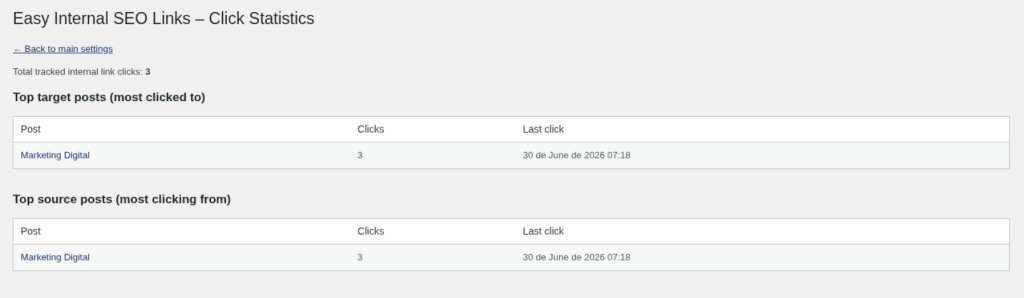
The click statistics show you exactly which internal links get engagement and which are ignored. Stop guessing what works and optimise your linking strategy with real behaviour data.
Blacklists, limits by content type, keywords per individual post: you get the same level of control as an enterprise solution, through an intuitive interface any editor can use without touching code.
Click tracking uses nonces tied to the source post, HMAC-SHA256 signing on the license API calls and rate limiting per IP. No data is shared with third parties and your data always stays on your server.
A digital publication with 500 published articles cannot afford to link each new post by hand to the relevant earlier content. With [B] Easy Internal SEO Links, every time you publish an article on a recurring topic, the internal links appear automatically across the whole archive, keeping editorial consistency effortlessly.
Managing the internal linking of 10 or 20 clients at the same time is not feasible by hand. With the Agency plan, you activate the plugin on all your sites, set up specific rules for each one and monitor performance from the click statistics. You deliver measurable SEO results without multiplying your working hours.
Online stores benefit greatly from cross-linking between blog articles and product pages. Define rules that automatically link the mentions of your products in the blog to the corresponding product pages, increasing internal traffic to the conversion pages without touching any post by hand.
Education portals with many lessons, modules and resources need a dense internal link network so that students navigate smoothly and Google understands the structure of the course. With keyword rules, every mention of a concept links automatically to the corresponding lesson.
YMYL (Your Money or Your Life) sectors need to show Google their topical authority through an interconnected content structure. The plugin lets you build that architecture systematically, making sure every article of a topic cluster links correctly to the content pillars of the site.
Upload the plugin folder to /wp-content/plugins/ or install it directly from the WordPress dashboard. Activate it on the Plugins screen. The automatic linking engine is ready to use from the first moment, with no prior setup.
Go to Tools → License ([B] Easy Internal SEO Links) and enter your license key to unlock the click statistics, the similarity index, the per-post meta box and the advanced settings. Activation takes less than 30 seconds.
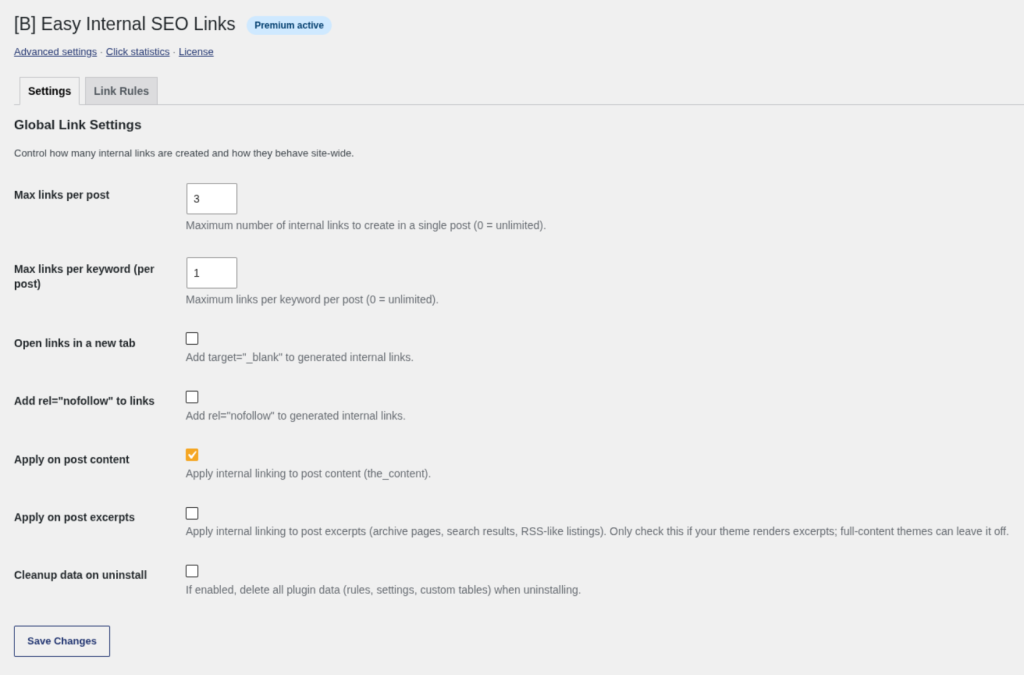
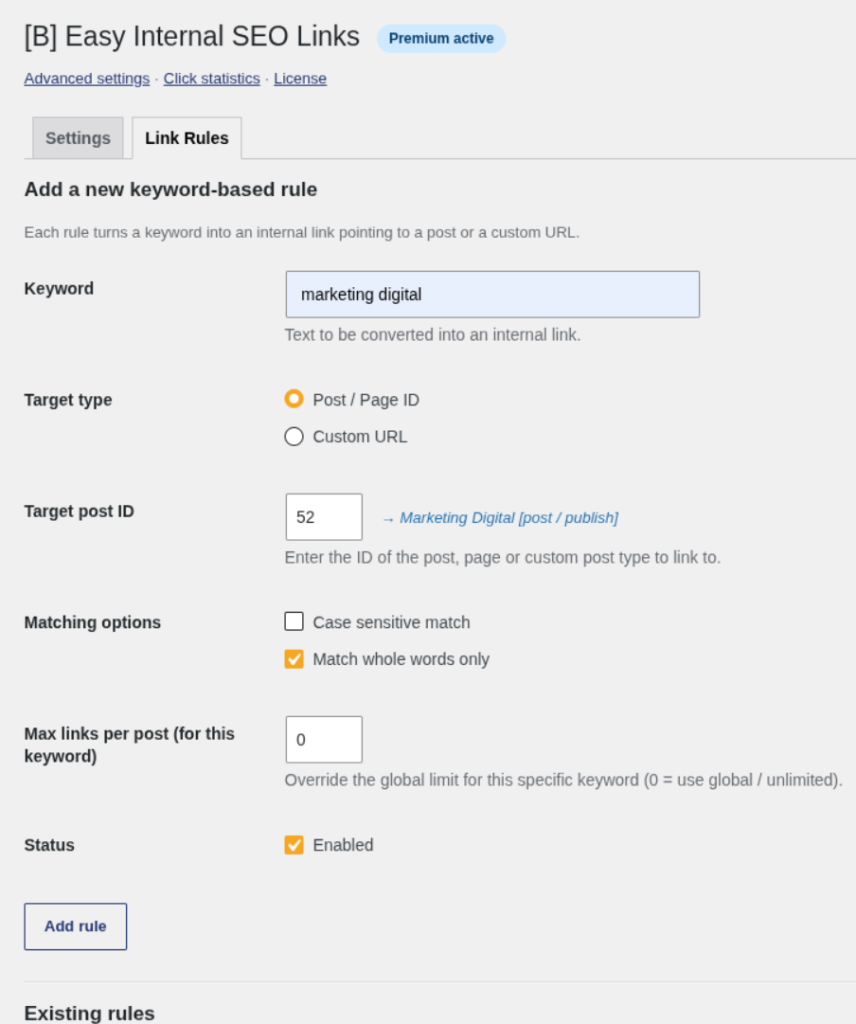
Open Settings → Easy Internal SEO Links and go to the Rules tab. Add a keyword, select the destination post or URL, set the occurrence limits and save. The plugin will start inserting that link into all your existing and future content straight away.
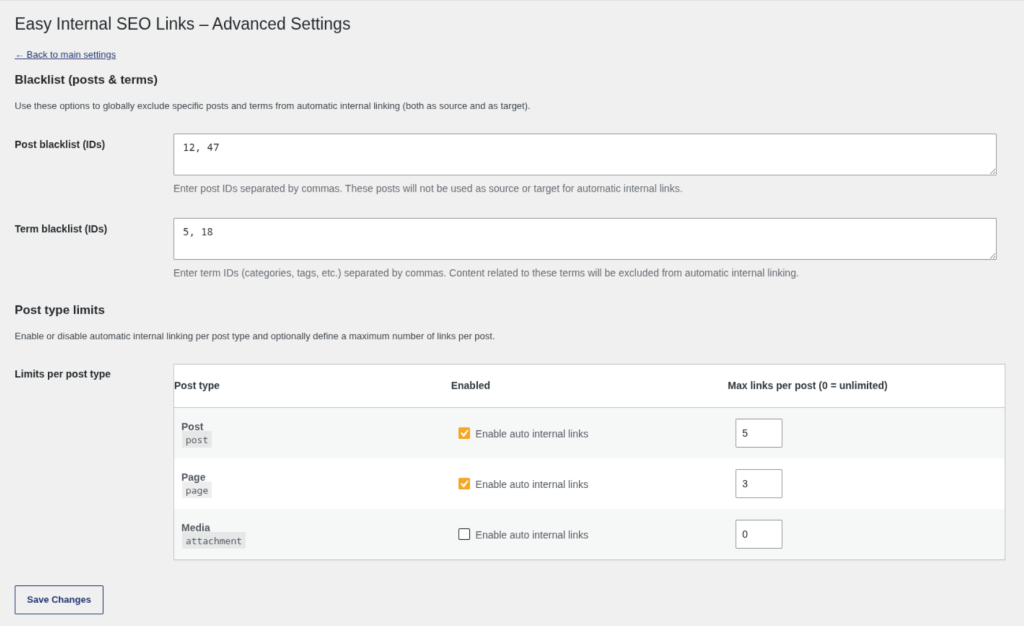
With the license active, visit Settings → EISL Advanced to set up blacklists and limits by content type. Check Settings → EISL Statistics regularly to see which links get the most clicks and optimise your rules accordingly.
Compare it with free plugins and manual solutions before you decide
| Aspect | Easy Internal SEO Links | Other solutions |
|---|---|---|
| Link generation without modifying the database | Yes, on-the-fly rendering with instant rollback | Most modify the content directly or use shortcodes |
| Built-in click statistics | Yes, with top destinations, top sources and tracking via sendBeacon | Not available in free plugins; requires Google Analytics or external tools |
| Protection against nested links | Yes, built-in protection in the engine core that cannot be turned off | Many free plugins produce invalid HTML with nested anchors |
| Control by content type (post type) | Yes, turn linking on or off for each post type individually | Usually all or nothing, with no granularity by content type |
| Post and term blacklists | Yes, exclude specific posts and taxonomies from automatic linking | Rarely available; requires custom code or extra plugins |
| Automatic updates from the WordPress dashboard | Yes, through [B] License Manager with HMAC-SHA256 signing | Free plugins update from the repository; premium ones often require a manual download |
| Support in Spanish with a guaranteed reply | Yes, email support in Spanish within 24–48 business hours | Public forums in English with unpredictable response times |
No. The automatic linking engine based on manual rules and the global settings work without a license. An active license unlocks the click statistics, the semantic similarity index, the per-post keywords meta box and the advanced settings page with blacklists and limits by content type. You can install the plugin, create your first rules and check that it works before deciding to buy.
No. Links are generated in real time when WordPress renders the content for the visitor. Your database stays intact at all times. This means you can turn rules on, off or delete them without leaving any trace in your posts, and that the plugin is completely reversible without cleaning anything up.
Through the [B] License Manager. While your license is active, the plugin appears on the standard WordPress Updates screen when a new version is available. You do not need to download anything by hand or visit any external portal. The update installs with one click, like any plugin from the official repository.
Yes. Both the manual rules and the similarity index are compatible with any public content type registered in WordPress. In addition, from the advanced settings page (premium) you can turn automatic linking on or off independently for each post type, which gives you full control over which content takes part in the linking.
No. This protection is built into the core of the linking engine and cannot be turned off. The plugin isolates every existing block before applying the rules, guaranteeing that nested hyperlinks are never produced, as they are invalid HTML and can cause rendering and accessibility problems.
Nothing is deleted. The blacklists, limits by content type, click statistics and per-post keywords are kept in your database. They simply stop being applied or shown in the dashboard until you reactivate the license. Your data is always under your control.
Only if you tick the "Clean up data on uninstall" option in the settings. If you do not, all the rules, blacklists and click statistics are kept in the database even if you uninstall the plugin. The clean-up on uninstall also purges the plugin's transients, including the per-IP rate limit buckets, with an optimised DELETE query.
The plugin injects a small front-end script that uses the browser's sendBeacon API to record clicks on the automatically generated links. Every tracking request is protected by a nonce tied to the ID of the source post, which makes it impossible to tamper with the statistics of a post without first loading that page. There is also a rate limit per IP to prevent abuse.
Yes. The plugin works on the content filtered by WordPress through the the_content hook, which is the standard mechanism used by every page builder and theme. Content generated by Elementor, Gutenberg, Divi or other builders goes through this filter and the automatic linking is applied correctly.
Yes, with the premium license active. From the advanced settings page you can add post IDs to the post blacklist (so they neither receive nor generate automatic links) and taxonomy term IDs to the term blacklist (to exclude all the content associated with those categories or tags). This is especially useful for landing pages, sales pages or content that should not take part in internal linking.
It depends on the plan you choose. The Personal plan covers 1 website, the Professional plan covers up to 5 sites and the Agency plan covers up to 25 sites. All plans include the same premium features; the only difference is the number of sites on which you can activate the license at the same time.
It has no external dependencies. It does not use React, Composer or any third-party library that adds weight to your installation. It is written in pure PHP and optimised to be as light as possible. The front-end click tracking script is minimal and only loads when there are automatic links on the page.
[ Keep exploring ]
SEO and performance
Streamline Your Media Library, Boost Performance
License From €29/year
SEO and performance
Find broken URLs and recover 404 traffic with smart WordPress redirects
License From €29/year
SEO and performance
See exactly where your visitors click, scroll and stop — right inside WordPress.
License From €39/year