Continuous Link Health Visibility
Track problematic links over time with structured logs that include HTTP status and source-page context for faster remediation.

[ SEO and performance ]
Find broken URLs and recover 404 traffic with smart WordPress redirects
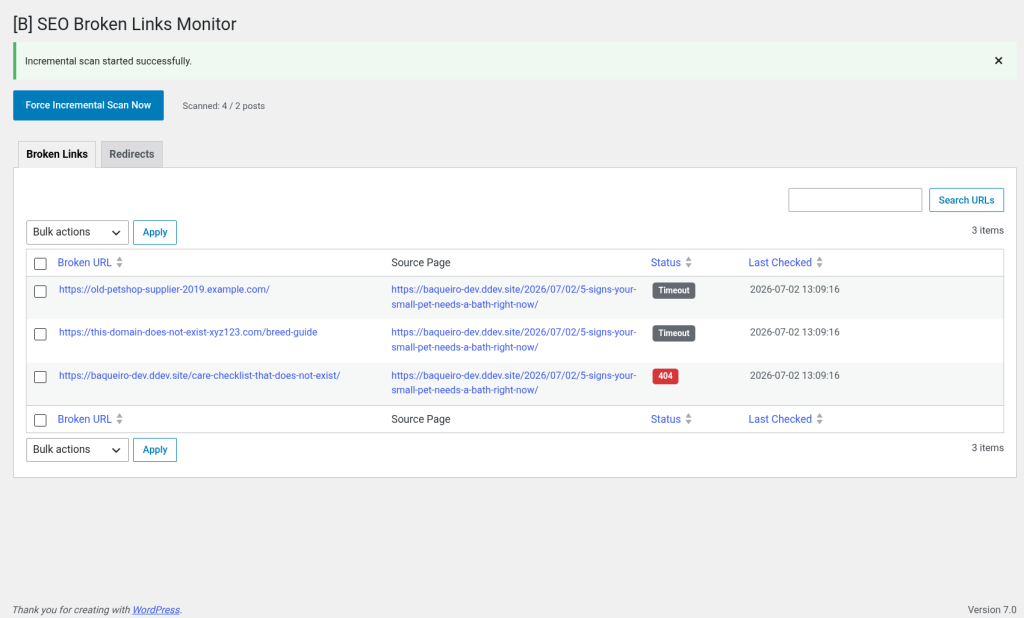
SEO Broken Links Monitor helps you protect rankings, user experience, and crawl efficiency by detecting broken URLs before they damage your site. Instead of relying on third-party SaaS platforms, the plugin runs directly in your WordPress environment, giving your team full control over data, performance, and workflow.
The plugin combines an incremental content crawler, a broken-link log, and a redirect manager in a single admin interface. It scans published posts and pages in small batches via WP-Cron, captures problematic links with HTTP status details, and tracks where each broken URL was found so your team can fix issues quickly and confidently.
When visitors hit missing URLs, the plugin can apply intelligent 404 recovery using slug similarity. You can optionally enable automatic redirect creation, define a similarity threshold, and keep manual control through a clear redirect table that includes hit counts and redirect type visibility. This gives you both automation and editorial oversight.
Built for production WordPress websites, the plugin includes secure admin actions with capability checks and nonce validation, dedicated database tables with indexes, lifecycle hooks for activation/deactivation/uninstall, and translation-ready architecture. It is engineered for WordPress 6.x and PHP 8.1+ with code quality aligned to WordPress Coding Standards.
Whether you run a content-heavy blog, a corporate site, or an agency maintenance portfolio, SEO Broken Links Monitor gives your team a practical, privacy-first system to keep link health under control and maintain a clean, trustworthy SEO foundation.
Track problematic links over time with structured logs that include HTTP status and source-page context for faster remediation.
Incremental scanning keeps workloads predictable by processing content in controlled batches instead of heavy full-site requests.
Use similarity-based automatic redirection to route visitors from missing URLs toward relevant existing pages when confidence is high.
Sensitive actions are protected with capability checks, nonce validation, and sanitized input handling aligned with WordPress best practices.
Indexed custom tables support efficient lookups for broken links and redirects, even on growing content websites.
Designed for ongoing site care, the plugin gives teams actionable admin screens, clear notices, and predictable maintenance routines.
Newsrooms and blog teams can continuously monitor legacy articles and fix outbound references before broken links impact trust and rankings.
Marketing teams can protect core landing pages by catching broken URLs early and managing redirects during rebrands or URL restructures.
Agencies can standardize recurring link-health checks across client portfolios and reduce manual troubleshooting time with centralized diagnostics.
Stores with buying guides and resource centers can preserve SEO value by identifying expired references and redirecting retired campaign URLs.
During URL mapping transitions, teams can verify redirected paths, monitor unresolved 404s, and improve post-launch stabilization speed.
Organizations with broad historical content can maintain accessible resource archives by detecting stale links and preserving discoverability.
Upload the plugin ZIP via Plugins → Add New → Upload Plugin, then activate it from the WordPress plugins screen.
Go to SEO Monitor in wp-admin to access the broken links table, redirect panel, and one-click scan controls.
Use the “Force Incremental Scan Now” action to populate initial diagnostics and verify current link health after installation.
Sort, search, and triage broken entries, then decide whether to fix links at the source, dismiss records, or create redirect rules.
In Settings, enable automatic similarity redirects if desired, set your threshold, and define whether uninstall should remove plugin data.
A practical comparison against generic link-monitoring alternatives
| Aspect | SEO Broken Links Monitor | Other solutions |
|---|---|---|
| Scanning strategy | Incremental WP-Cron batches tuned for stability | Heavy full-site scans that can timeout |
| Broken link context | Stores source page and status code for each issue | Limited or generic error output |
| 404 recovery options | Manual redirects plus similarity-based automation | Manual redirects only |
| Operational ownership | Runs directly in WordPress, no SaaS dependency | External service dependency and separate dashboards |
| Admin usability | Searchable list table, bulk actions, accessible tabbed UI | Basic interfaces with limited workflow support |
| Code quality and maintainability | WPCS-aligned architecture with lifecycle and QA routines | Inconsistent standards and opaque maintenance paths |
The plugin runs an incremental crawler that checks published posts and pages in small batches. It parses links from content, performs HTTP checks, and stores status results in dedicated tables along with the source URL, making it easy to trace and fix each issue.
The scanner is designed for low overhead. Instead of crawling the entire site in one request, it processes a limited number of posts per cycle through WP-Cron and uses indexed custom tables for lookup performance. This approach helps reduce spikes and keeps admin operations responsive.
Yes. The dashboard includes a “Force Incremental Scan Now” action so administrators can trigger a scan on demand. This is useful after major content edits, migrations, or redirect changes when you want fresh link health data right away.
When enabled, the plugin can analyze 404 request slugs and compare them to existing published slugs. If a match exceeds your configured similarity threshold, it can create a redirect rule and send the visitor to the closest relevant page.
Absolutely. You can disable automatic redirects entirely and manage rules manually in the redirect table. The plugin supports both 301 and 302 behavior visibility, and tracks hit counts so you can evaluate whether each rule is useful over time.
No. Core monitoring and redirect features run inside WordPress without requiring an external SaaS account. This helps with privacy, operational stability, and cost control, especially for agencies managing multiple client properties.
The plugin follows standard WordPress APIs and activation lifecycle patterns, so it can be used in multisite environments. As with any production multisite deployment, we recommend validating scheduling and table behavior in staging before rolling out network-wide.
By default, historical data is preserved. If you want full cleanup, enable the “Delete Data on Uninstall” option in settings. When this option is active, plugin tables and scan metadata are removed during uninstall to support clean deprovisioning workflows.
The plugin provides an actionable admin list with sorting, searching, and bulk handling for day-to-day operations. For advanced reporting pipelines, agencies can read the structured table data directly and integrate it into internal maintenance dashboards.
You receive direct support from Baqueiro Desarrollo Web via email and live chat during business hours (9-18h CET), plus product updates and compatibility maintenance within your license period.
[ Keep exploring ]
SEO and performance
Streamline Your Media Library, Boost Performance
License From €29/year
SEO and performance
See exactly where your visitors click, scroll and stop — right inside WordPress.
License From €39/year
SEO and performance
Automatic WebP/AVIF with responsive delivery and LCP optimisation
License From €29/year