Never Lock Yourself Out
The WordPress admin, login and APIs stay fully accessible while front-end visitors see the redirect. Security is built in, not bolted on.

[ Management and productivity ]
A maintenance redirect that never locks you out. Secure by default.
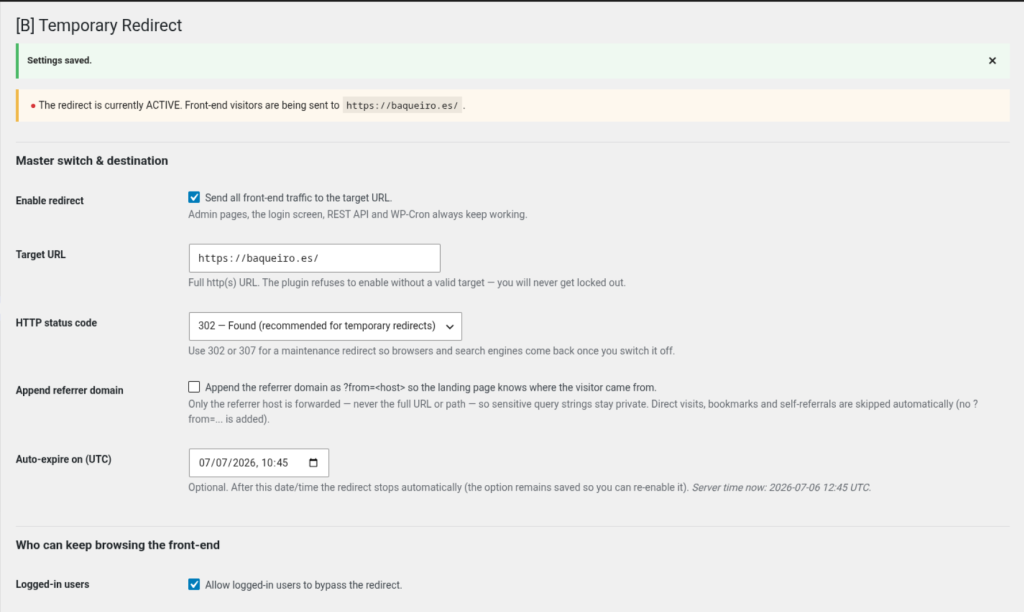
Construir un nuevo sitio WordPress requiere tiempo. Mientras tu diseño y contenido están en progreso, te enfrentas a una disyuntiva: lanzar un sitio inacabado y confundir a los visitantes, o permanecer offline y perder impulso. [B] Temporary Redirect resuelve este dilema enviando a cada visitante del front-end a una página de espera, un landing de próxima apertura, o una URL asociada—mientras tú y tu equipo mantenéis acceso total al admin, capacidad de login y funcionalidad de API. La redirección es temporal, reversible y segura por diseño.
La mayoría de plugins de mantenimiento o te bloquean el acceso a tu propia área de admin o dejan expuestos puntos finales críticos. [B] Temporary Redirect está diseñado para ser a prueba de balas: automáticamente exime WordPress admin, login, REST API, WP-Cron, WP-CLI y XML-RPC de la redirección. Estableces una URL de destino, eliges tu código de estado HTTP (302 para temporal, 301 para permanente), y el plugin se encarga del resto. Sin código personalizado. Sin sobrecarga de base de datos. Sin seguimiento de visitantes ni almacenamiento de datos. El plugin solo almacena su propia configuración y un secreto de bypass rotativo—nada más.
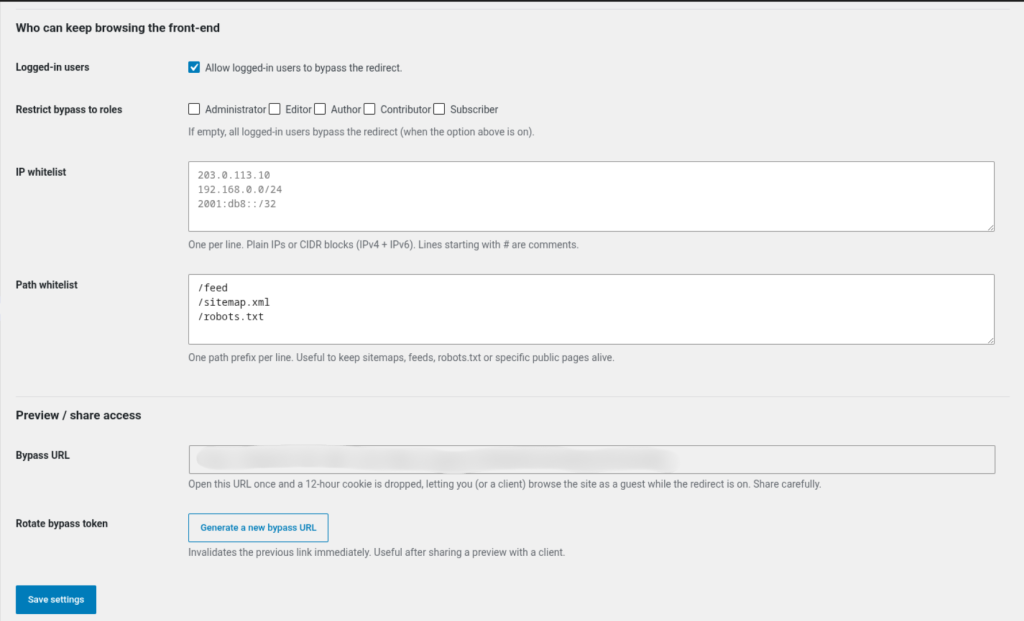
Ya seas un freelancer lanzando sitios de clientes, una agencia gestionando múltiples proyectos, un desarrollador reconstruyendo un dominio existente, o una empresa en transición a una nueva plataforma, [B] Temporary Redirect te da el respiro que necesitas. Avisa a los prospectos que estás por llegar. Redirige tráfico a tu sitio anterior, un dominio asociado, o una página de destino. Otorga acceso selectivo a miembros del equipo, stakeholders y socios de confianza a través de un enlace de vista previa compartible. Añade a la lista blanca rangos de IP específicos, rutas geográficas o dominios referentes para que ciertos usuarios siempre vean la versión en vivo. Programa la redirección para desactivarse automáticamente en una fecha y hora futuras—perfecto para coordinar un lanzamiento entre zonas horarias.
El plugin está construido para WordPress 6.0+ y PHP 8.1+, probado hasta WordPress 6.8, y sigue las mejores prácticas de seguridad de WordPress. Se niega a activar la redirección a menos que haya una URL de destino válida configurada, muestra una insignia roja en la barra de admin para que cada usuario conectado sepa que la redirección está activa, y soporta listas blancas IPv4 e IPv6 con notación de bloques CIDR. Si tu sitio está detrás de un proxy inverso o balanceador de carga, un simple filtro te permite confiar en el encabezado X-Forwarded-For. El token de bypass se elimina de la URL después de que se establece la cookie, previniendo fugas accidentales a través del historial del navegador o encabezados referentes enviados a sitios externos.
La configuración toma cinco minutos: instala, activa, introduce tu URL de destino y activa la redirección. La página de configuración es limpia, intuitiva y no requiere conocimiento técnico. El control basado en roles significa que los usuarios conectados pueden navegar el sitio real mientras los visitantes anónimos ven la redirección. La lista blanca de rutas mantiene tus feeds, sitemaps, robots.txt y endpoints personalizados accesibles. La función opcional de expiración automática significa que puedes programar la redirección para desactivarse a una fecha y hora UTC específicas—sin intervención manual necesaria en el día del lanzamiento.
A diferencia de las herramientas de migración SEO que utilizan redirecciones permanentes 301 (que los motores de búsqueda cachean agresivamente), [B] Temporary Redirect utiliza por defecto códigos de estado 302 y 307. Esto le dice a los motores de búsqueda que la redirección es temporal, para que la indexación se reanude normalmente en el momento en que desactives el plugin. Sin daño permanente al SEO. Sin limpieza requerida después. Cuando tu sitio esté listo, desactiva la redirección y observa cómo tu contenido real comienza a posicionarse.
Deja de hacer malabares con redirecciones manuales, reglas de htaccess o redirecciones caras a nivel de hosting. Deja de preocuparte por bloquearte a ti mismo o exponer páginas a medio construir a los motores de búsqueda. [B] Temporary Redirect es la solución de redirección de mantenimiento construida para equipos WordPress modernos. Profesional, segura y lista para usar en minutos.
The WordPress admin, login and APIs stay fully accessible while front-end visitors see the redirect. Security is built in, not bolted on.
Schedule the automatic expiry for the exact moment your site goes live. No manual switch changes. No time zone confusion.
Grant early access through shareable preview links, whitelist specific IPs and roles, and revoke access instantly with one click.
Uses temporary 302/307 redirects by default so search engines know to come back. No permanent damage to indexing. No clean-up needed afterwards.
No custom tables, no visitor logs, no personal data stored. Only your settings and a rotating bypass secret. The clean uninstall removes everything.
Five-minute installation with no custom code required. An intuitive settings page. No technical knowledge needed.
Redirect traffic to your previous site while you build the new one. Whitelist your IP and your team members so you can work in peace. Launch when it is ready, with no manual redirect changes required.
Send visitors to a Mailchimp signup form, a custom landing page or a partner domain while your WordPress site is under construction. Share preview links with investors, stakeholders or beta testers.
Agencies can redirect client domains to a holding page during development, grant the client preview access through a shareable link and schedule the automatic expiry for the exact launch moment across time zones.
Moving from a previous platform to WordPress? Redirect the old domain to a new site while keeping your admin area accessible for final adjustments and testing.
Redirect during major updates or server maintenance. Whitelist your office IP and trusted partners so work can continue while other visitors see a "We will be back soon" message.
Upload [B] Temporary Redirect to /wp-content/plugins/ or install it through Plugins → Add New, then activate it from the Plugins screen.
Go to Settings → Temporary Redirect. Enter the URL you want to send visitors to (a coming-soon page, a partner site or your previous domain). Choose your HTTP status code (302 for temporary, 301 for permanent). Set up IP whitelists, path whitelists and role-based access if needed.
Copy the Preview Bypass URL to share it with clients and stakeholders, or set an automatic expiry date and time so the redirect turns off automatically on launch day.
Tick "Enable redirect" and save. The red badge in the admin bar confirms the redirect is active. When you are ready to launch, turn the redirect off or let the automatic expiry take care of it.
Turn the redirect off with one click, rotate the preview token to revoke shared links, or adjust whitelists at any time without downtime.
See how the specific beats the generic
| Aspect | Temporary Redirect | Other solutions |
|---|---|---|
| Admin and login exemption | Automatic, always protected | Manual htaccess rules or no protection |
| Shareable preview links with token rotation | One-click sharing and instant revocation | Manual user creation or none |
| Automatic expiry scheduling | Set it once, it launches automatically at the UTC time | Manual deactivation on launch day |
| IPv4, IPv6 and CIDR whitelist support | Full support for modern IP ranges | Only basic IPv4, or none |
| Prevents infinite redirect loops | Validates the destination URL before saving | No validation, risk of lock-out |
| SEO-safe by default (302/307 status codes) | Temporary redirects, indexing resumes when turned off | Often 301 by default, permanent damage |
| Zero visitor tracking or data storage | Privacy first, only settings stored | Some free plugins log visitor data |
No. The plugin always exempts wp-admin and wp-login.php from the redirect, and refuses to save an "enabled" state without a valid destination URL. As an extra safety net, the admin bar shows a red "Temporary Redirect ACTIVE" badge whenever the redirect is active, so every logged-in user knows to check the settings if something looks wrong.
Yes. The settings page shows a "Preview Bypass URL" that anyone can open once to receive a 12-hour cookie that bypasses the redirect. You can share this link with clients, stakeholders or team members. One-click token rotation instantly invalidates every previously shared link, so you stay in control of who sees what and when.
For a temporary maintenance redirect, use 302 (Found) or 307 (Temporary Redirect). Avoid 301 and 308: browsers and search engines cache permanent redirects aggressively, so visitors may keep being redirected even after you turn the plugin off. The plugin uses 302 by default, which tells search engines the redirect is temporary and indexing will resume normally once you turn the plugin off.
By default, the plugin uses the raw REMOTE_ADDR address of the request, which an attacker cannot spoof. If your site is behind a trusted reverse proxy (such as Cloudflare, AWS ALB or an nginx reverse proxy), add this filter to your theme's functions.php or to a custom plugin to trust the X-Forwarded-For header: add_filter( 'bdw_tr_trust_proxy_headers', '__return_true' );
Yes, that is the whole point. While the redirect is active, search engines see the 302/307 status and do not index your half-built site. Because the plugin uses temporary status codes by default, Google and other engines resume normal indexing the moment you turn the redirect off. No permanent SEO damage, no clean-up needed afterwards.
Yes. The settings page includes an optional "Auto-expiry" field where you can set a UTC date and time. The plugin will turn the redirect off automatically at that moment, perfect for coordinating a launch across time zones. The server's current UTC time is shown next to the field so you can schedule it precisely.
No. The plugin only stores its own settings (destination URL, status code, whitelists, etc.) and a rotating bypass secret in the options table. It does not create custom database tables, does not log visitor IPs or referrers, and does not store any personal data. Uninstalling the plugin completely removes its own options.
Yes. The settings page includes an IPv4/IPv6 whitelist field that accepts individual IPs and CIDR blocks (e.g. 192.168.1.0/24). There is also a path prefix whitelist so you can keep /feed, /sitemap.xml, /robots.txt, /api or any other endpoint accessible while the redirect is active. One prefix per line.
Yes. By default, every logged-in user sees the real site and is not redirected. You can optionally restrict this to specific user roles (e.g. only editors and administrators see the live site, while subscribers are redirected). This is useful if you want clients or team members with lower permissions to see the holding page instead.
The plugin detects this and refuses to save the settings. It checks that the destination URL points to a different domain from your WordPress site, preventing infinite redirect loops before they can happen.
Yes, [B] Temporary Redirect is fully compatible with WordPress Multisite. Each site in the network has its own independent redirect settings, so you can set different destination URLs and whitelists for each site without conflicts.
Five minutes. Install the plugin, activate it, go to Settings → Temporary Redirect, enter your destination URL, select your HTTP status code and tick "Enable redirect". Save and you are done. No custom code, no technical knowledge required.
[ Keep exploring ]
Management and productivity
Server IP, DNS and network data in your WordPress dashboard
No cost Free
Management and productivity
Real financial control for agencies, in your WordPress
License From €39/year
Management and productivity
From calendar to certificate — every event step handled, on your server.
License From €79/year