Removes a critical security risk
Closes the most common gap: sensitive files publicly exposed in uploads. Without this plugin, logs, backups and confidential data can be downloaded by anyone.

[ Security and privacy ]
Protect sensitive uploads. Block direct access. Keep public media.
WordPress almacena archivos en wp-content/uploads sin protección nativa. Logs, backups, exportaciones de datos, archivos ZIP y dumps de depuración quedan expuestos públicamente. Un atacante puede descubrir y descargar información sensible directamente desde la URL, sin necesidad de acceder al panel de administración. Este es un riesgo de seguridad crítico que la mayoría de sitios ignoran.
[B] Secure Uploads Guard cierra esta brecha de seguridad de forma automática. El plugin desactiva el listado de directorios en la carpeta uploads, bloquea el acceso directo a extensiones de archivo peligrosas (ZIP, SQL, LOG, DUMP, etc.) y enruta las solicitudes de archivos protegidos a través de WordPress, donde se valida la autenticación y los permisos del usuario. Los medios públicos (imágenes, vídeos, documentos permitidos) siguen funcionando sin problemas. No rompe el sitio. No requiere configuración manual compleja.
Es ideal para agencias que gestionan múltiples sitios, desarrolladores que trabajan en staging con datos reales, tiendas WooCommerce con información de clientes en uploads, y cualquier WordPress que maneje datos confidenciales. También es esencial para cumplir normativas de protección de datos: RGPD, LOPD, y auditorías de seguridad cada vez exigen que los archivos sensibles no sean accesibles públicamente.
El plugin funciona en Apache, LiteSpeed y Nginx. En Apache/LiteSpeed, escribe un bloque .htaccess gestionado automáticamente en uploads/. En Nginx, proporciona un snippet de configuración listo para copiar. Si WordPress está en un subdirectorio (ej: /devops/), el plugin ajusta las rutas de reescritura automáticamente. La instalación es segura: el plugin detecta tu servidor, valida las reglas y proporciona un diagnóstico completo.
Incluye una herramienta de diagnóstico integrada: “Prueba la seguridad de tus uploads” valida que el listado de directorios esté bloqueado, que los archivos sensibles no sean accesibles, y que los medios públicos sigan funcionando. Realiza pruebas en la raíz de uploads y en uploads/YYYY/MM/ para reflejar casos reales. Los resultados aparecen al instante en el panel de administración.
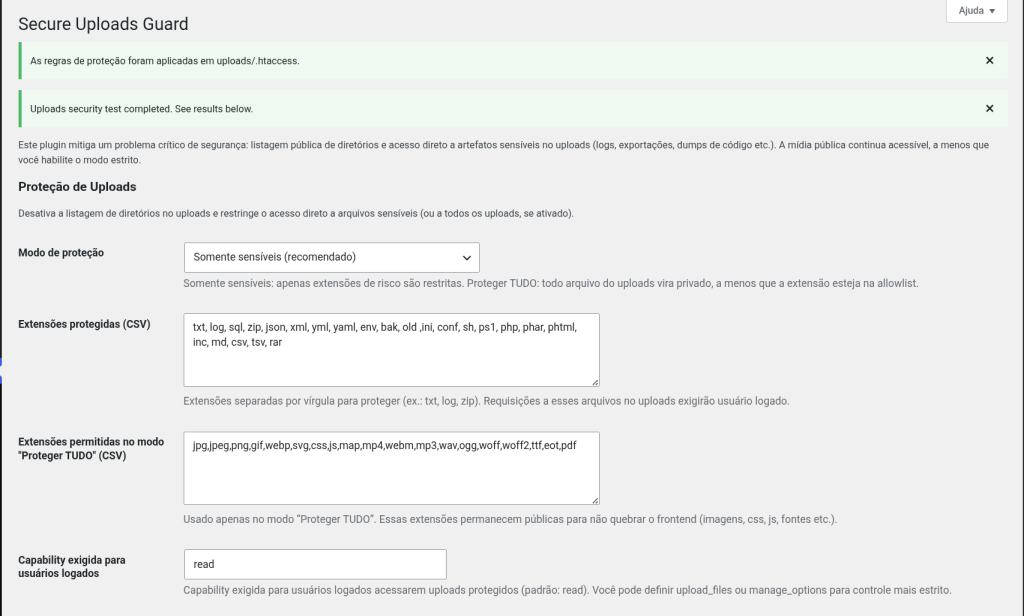
La configuración es flexible. Modo “Solo sensibles” (recomendado para producción) bloquea solo extensiones peligrosas. Modo “Proteger TODO” (para staging/desarrollo) hace privado todo excepto extensiones permitidas (imágenes, CSS, JS, fuentes). Puedes exigir que los usuarios sean administradores, editores, o cualquier rol personalizado. El plugin es ligero, no ralentiza el sitio, y se integra con cualquier tema o plugin.
Activar [B] Secure Uploads Guard es la forma más rápida de eliminar un riesgo de seguridad crítico que afecta a miles de sitios WordPress. En cinco minutos tienes uploads protegidos, diagnóstico validado, y tranquilidad operativa. Sin código, sin complejidad, sin sorpresas.
Closes the most common gap: sensitive files publicly exposed in uploads. Without this plugin, logs, backups and confidential data can be downloaded by anyone.
Installation in five minutes, no code, no manual setup. The plugin detects your server and handles everything automatically.
Meets GDPR, LOPD and security audit requirements. Sensitive data is not publicly accessible, which is mandatory in many jurisdictions.
The built-in diagnosis confirms that everything works. Public media keeps working. The site does not break. Zero surprises after installation.
Unlimited sites on the Agency plan. Protect all your projects with a single purchase. Priority support included.
A light plugin that does not slow the site down. Handles uploads of any size. Works on Apache, LiteSpeed and Nginx without problems.
Protect customer data, invoices, sales reports and supplier files stored in uploads. Comply with GDPR and keep your operations confidential.
Make sure internal documents, financial reports and exclusive member content are not public. Control access by role.
Protect every client project with a single license. Unlimited Agency plan. Reduce the security support workload.
Use "Protect EVERYTHING" mode for staging with real data. Avoid the accidental exposure of test data or sensitive information during development.
Meet GDPR, LOPD and ISO 27001 audits and security assessments. Show that sensitive data is not public.
Upload [B] Secure Uploads Guard to /wp-content/plugins/ or install it via Plugins → Add New. Activate it from the admin dashboard.
Go to Settings → Secure Uploads Guard. Select "Sensitive only" (recommended for production) or "Protect EVERYTHING" (for staging). Set up permissions if needed.
Click "Test the security of your uploads". The diagnosis checks that listing is blocked, sensitive files are not accessible and public media works.
The plugin shows the Nginx snippet automatically. Copy it into your server configuration, reload Nginx and you are done. Apache/LiteSpeed is automatic.
The plugin needs no maintenance. If you change mode or server, run the diagnosis again to validate it. Support is available if you need help.
Comparison with alternatives and the manual approach
| Aspect | Secure Uploads Guard | Other solutions |
|---|---|---|
| Automatic disabling of directory listing | Yes, automatic on Apache/LiteSpeed, snippet ready for Nginx | Requires manual .htaccess or Nginx configuration |
| Blocking of direct access to sensitive files | Yes, sensitive or protect-everything mode, configurable | Generic plugins do not do it; requires manual rewriting |
| Built-in diagnostic tool | Yes, validates security in one click with a detailed report | Requires manual tests or external tools |
| Automatic adjustment for WordPress in a subdirectory | Yes, detects and adjusts the paths automatically | Requires editing the rewrites by hand |
| Granular permission control by role | Yes, configurable by capability (admin, editor, custom) | Generic plugins offer limited control |
| Safe .htaccess handling (no conflicts) | Yes, managed block, safe install/uninstall | Risk of conflicts with other plugins or manual rules |
| Support in Spanish + documentation | Yes, email/chat support during CET hours, docs in Spanish | Generic support, documentation in English |
No. In "Sensitive only" mode (recommended), common public media extensions (jpg, png, webp, gif, mp4, pdf, etc.) stay public and accessible. Only dangerous extensions such as ZIP, SQL, LOG, DUMP, BAK are blocked. If you turn on "Protect EVERYTHING" mode, you must keep a list of allowed extensions that includes those used by your theme/plugins (images, CSS, JS, fonts); otherwise the front end could break.
No. Nginx completely ignores .htaccess. The plugin automatically detects that you use Nginx and shows you a configuration snippet ready to copy into your server or location block. You only need to paste it into your Nginx configuration and reload the service. The plugin provides step-by-step instructions in the admin dashboard.
Turning off directory listing only stops the server from showing the "Index of /" view. It does not automatically block direct access to individual files. This plugin goes further: it blocks direct access to the configured extensions (sensitive mode) or to everything except the allowed ones (protect everything mode), as long as the server rules are applied correctly. Use the diagnostic tool to check that everything is working.
Yes. In the settings, set "Capability required for authenticated users" to "manage_options" (administrators only). You can also use custom roles. The plugin checks the capability before allowing the download.
Temporarily, yes. The tool creates a .txt file and a .jpg image to test the directory blocking and direct access, then deletes them automatically. It runs tests in uploads/ and uploads/YYYY/MM/ to reflect real behaviour. The report appears instantly in the dashboard.
Yes, it is fully compatible with WordPress Multisite. The plugin correctly handles the uploads paths of each subsite and applies the protection rules independently. Each site can have its own settings.
The plugin automatically detects where WordPress is and adjusts the rewrite paths accordingly. You need no manual setup. Version 1.4.0+ includes specific fixes for this use case.
No. The plugin is completely visual. Activate it, choose the protection mode and click "Test the security of your uploads". If you use Nginx, the plugin shows you the snippet; if you use Apache/LiteSpeed, everything is automatic. Support is available if you need help.
Yes. It ensures that personal and sensitive data stored in uploads is not publicly accessible, which is a key requirement of GDPR, LOPD and security audits. It is not the only measure needed, but it is essential.
Yes. You can switch between "Sensitive only" and "Protect EVERYTHING" mode at any time from the settings. The diagnosis will help you check that the new settings work correctly.
[ Keep exploring ]
Security and privacy
Protection against malicious injections with no external contact and no loss of privacy
No cost Free
Security and privacy
Complete RGPD, LOPDGDD & LSSI-CE compliance — built for Spain, runs on your server.
License From €49/year
Security and privacy
The 404-pattern firewall that catches what generic security plugins miss.
License From €29/year