Immediate speed improvement
WebP and AVIF reduce image size by 25-35% compared with JPG/PNG. Your pages load faster, your visitors see content sooner and your conversions go up. Measurable in Google Analytics.

[ SEO and performance ]
Automatic WebP/AVIF with responsive delivery and LCP optimisation
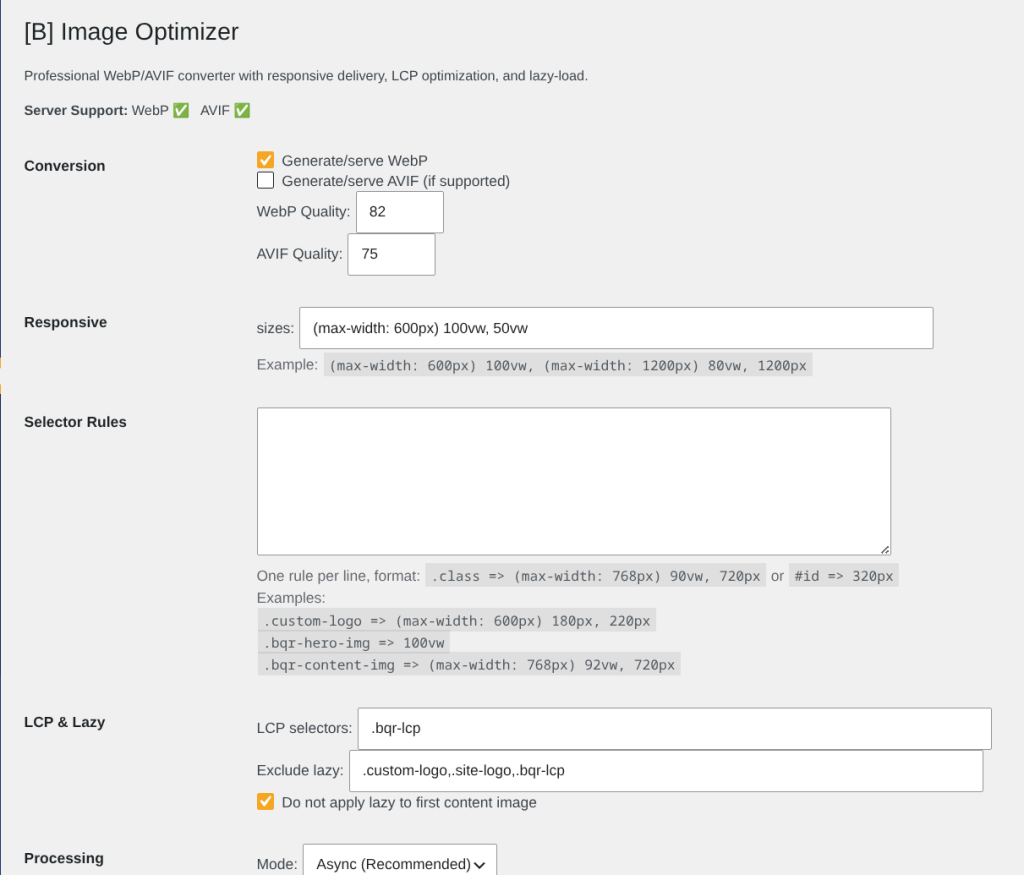
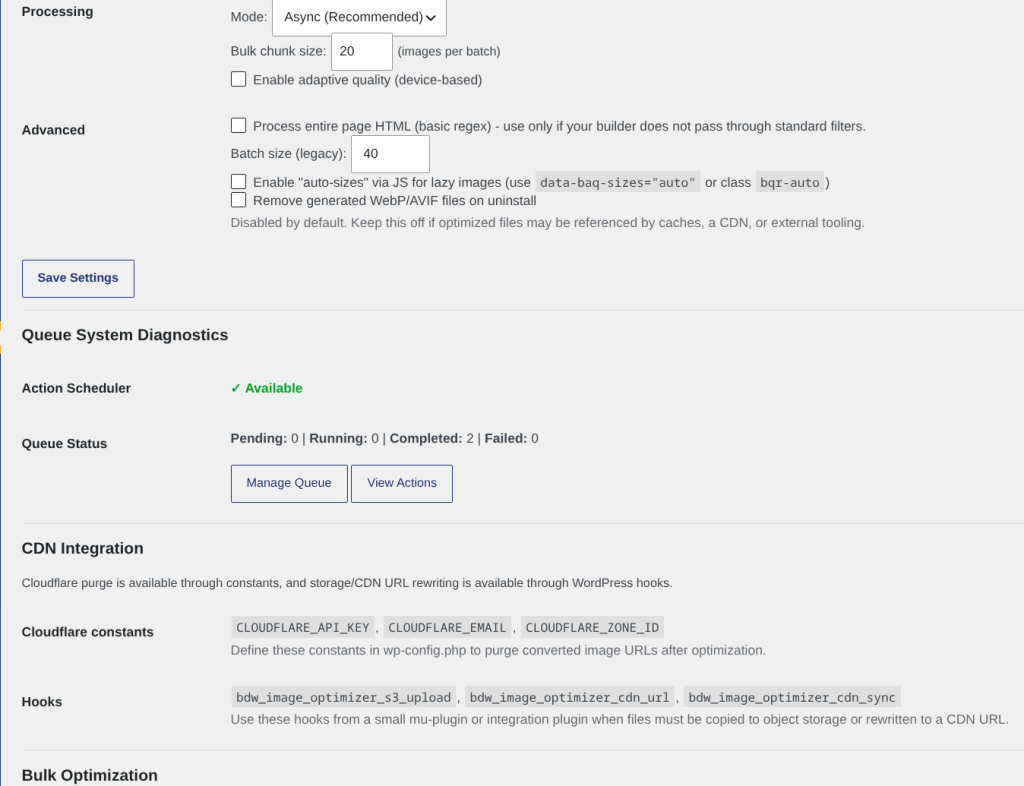
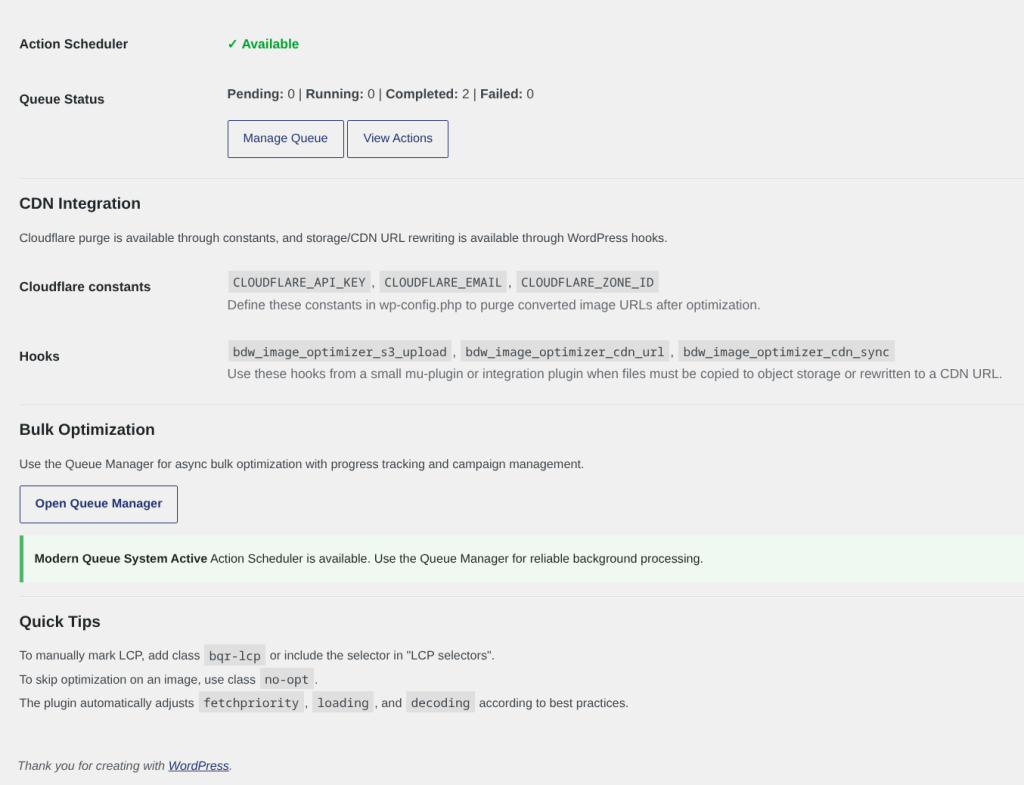
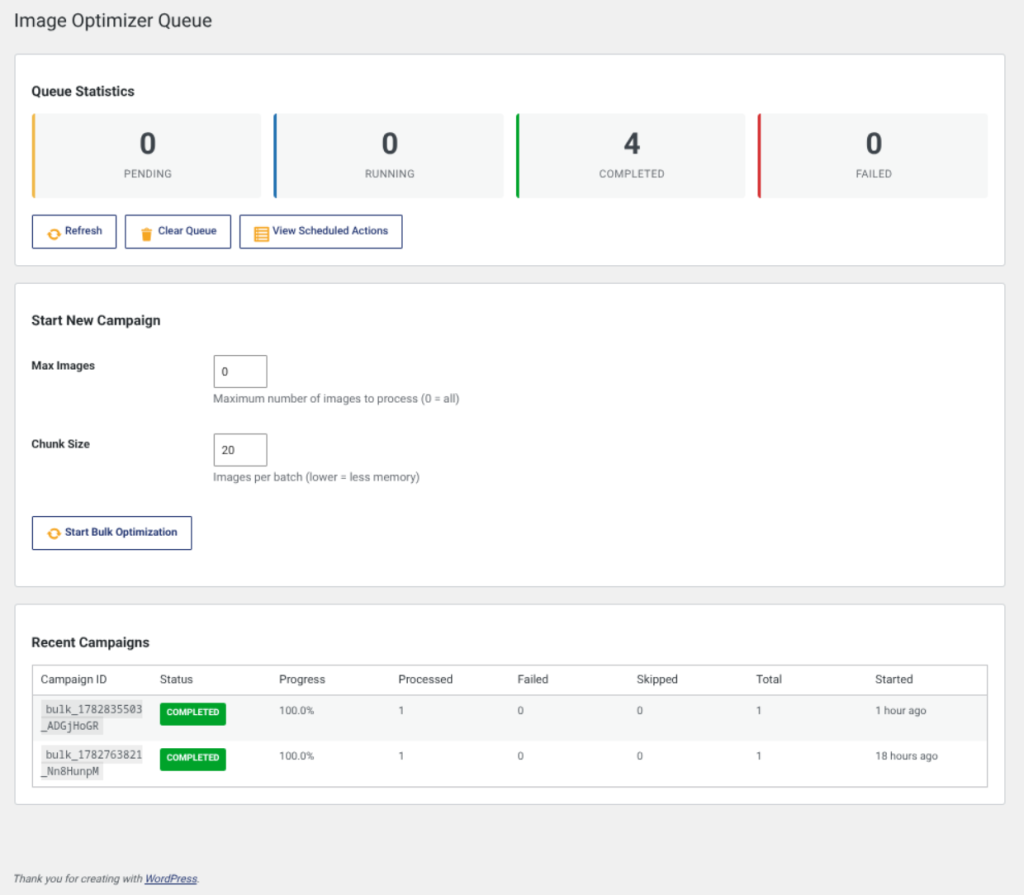
Las imágenes sin optimizar son el lastre silencioso de los sitios WordPress modernos. Mientras tus competidores cargan WebP y AVIF, tus visitantes esperan JPG sin comprimir. El resultado: tasas de rebote más altas, rankings de SEO más bajos, y clientes potenciales que nunca llegan a tu formulario de contacto. [B] Image Optimizer resuelve este problema de raíz: convierte cada imagen automáticamente en formatos modernos, las entrega con etiquetas <picture> responsive, y optimiza tu Largest Contentful Paint sin que tengas que tocar una línea de código.
Nuestro plugin no es un convertidor básico. Funciona en segundo plano mediante colas de procesamiento confiables, detecta automáticamente qué imágenes son críticas para el rendimiento, aplica lazy loading inteligente, y evita cambios de diseño mediante atributos de ancho y alto. Soporta tanto Imagick como GD, funciona con cualquier tema, y se integra sin fricciones con tus flujos de trabajo existentes. Carga una imagen, y [B] Image Optimizer se encarga del resto.
Tanto si diriges una tienda WooCommerce con miles de productos, un blog de fotografía, un sitio corporativo, o una agencia con múltiples clientes, este plugin escala contigo. Los equipos de desarrollo aprecian su arquitectura limpia basada en estándares WordPress, sus hooks y filtros extensibles, y su cumplimiento total de WPCS. Los propietarios de sitios aman que simplemente funcione: sin configuración compleja, sin servicios externos, sin sorpresas.
La compatibilidad es total. WordPress 6.0+, PHP 8.1+, todos los temas, todos los constructores de páginas. Hemos probado con Elementor, Divi, GeneratePress, Astra y cientos más. Si tu tema usa funciones estándar de WordPress para imágenes, [B] Image Optimizer las optimizará automáticamente. Si necesitas casos de uso avanzados, nuestros filtros y acciones te permiten personalizar cada aspecto del comportamiento del plugin sin bifurcar código.
El procesamiento en lote es donde brilla realmente. Imagina tener una biblioteca de medios de 10.000 imágenes. En lugar de bloquear tu servidor, nuestro sistema de colas Action Scheduler procesa las imágenes en lotes configurables, sin afectar la experiencia de los visitantes. Puedes monitorizar el progreso en tiempo real, pausar cuando lo necesites, y reanudar donde lo dejaste. Para servidores con recursos limitados, simplemente reduce el tamaño del lote. Para infraestructuras robustas, aumenta la velocidad.
La seguridad no es una ocurrencia tardía. Cada acción está protegida por nonces, se valida según los permisos de usuario, y se sanitizan todas las entradas. No recopilamos datos de usuario, no enviamos imágenes a servidores externos, y cumplimos completamente con GDPR y AEPD. Tu sitio, tus datos, bajo tu control total. Además, incluimos soporte nativo para purga de caché de Cloudflare, y hooks para integraciones personalizadas con S3, CDN personalizados, y sistemas de almacenamiento de objetos.
El tiempo es dinero. Con [B] Image Optimizer, ahorras horas de optimización manual, evitas el costo de servicios externos de conversión de imágenes, y obtienes mejores puntuaciones de rendimiento en PageSpeed Insights. Tu equipo de soporte gasta menos tiempo respondiendo sobre velocidad del sitio. Tu equipo de desarrollo pasa menos tiempo depurando problemas de imágenes. Y tus clientes disfrutan de un sitio más rápido, más responsivo, y más moderno. Eso es valor real, medible, en tu balance final.
WebP and AVIF reduce image size by 25-35% compared with JPG/PNG. Your pages load faster, your visitors see content sooner and your conversions go up. Measurable in Google Analytics.
Google rewards fast sites. Automatic LCP optimisation, lazy loading and responsive delivery improve your Core Web Vitals. The result: better organic rankings and more traffic, without changing your content.
Faster images mean less frustration, fewer bounces and more time on site. Mobile visitors (where bandwidth is limited) see a dramatic difference. That translates into more leads, more sales, more engagement.
No external services, no APIs, no data in the cloud. All processing happens on your server. Automatic GDPR/AEPD compliance, with no complicated audits and no regulatory compliance risks.
No need to optimise images by hand, no need for external tools, no need to hire performance specialists. The plugin does the work. Your team focuses on what matters: content, strategy, sales.
Process 100 images or 100,000. The queue system adapts to your server. Grow your site without worrying about image optimisation. The plugin scales with you, automatically.
You are not alone. Access to complete documentation, video tutorials and an available support team. From the initial setup to advanced use cases, we help you get the most out of the plugin.
Automatically optimise thousands of product images. Fast, responsive images improve the shopping experience, reduce cart abandonment and improve SEO for product searches. Full support for product galleries.
Deliver high-quality WebP/AVIF without losing detail. Images load faster, visitors see galleries without waiting and your work is shown in its best light. Smart lazy loading for large galleries.
Automatically optimise all your article images. Improve Core Web Vitals, increase organic traffic and reduce bandwidth costs. Compatible with any blog theme.
Projects, testimonials, team, gallery: every image optimised automatically. Impress visitors with a fast, professional site. Improve your online presence without technical effort.
Manage image optimisation for several clients from a single dashboard. Each site has its own settings and processing history. Scale without limits, without manual maintenance.
Mobile users benefit most from optimised images. WebP/AVIF + lazy loading + responsive delivery = a superior mobile experience. Less data used, faster loading, a better experience.
Download the plugin from your account, upload the ZIP to WordPress (Plugins → Add New → Upload Plugin) and activate it. It takes less than 1 minute.
Go to Settings → [B] Image Optimizer. Turn on WebP (on by default), set the quality (we recommend 82 for WebP, 75 for AVIF) and adjust the LCP selectors if needed. The default settings work for 95% of sites.
Go to Media → Optimisation Queue. Click "Start new campaign" and select "Convert the whole library". The system will process your images in the background without affecting your site. Monitor the progress in real time.
Open a page in your browser, inspect the HTML (F12) and you will see the tags with WebP. Run Lighthouse or PageSpeed Insights: you will see immediate improvements in Core Web Vitals. Done.
If you need custom size rules per selector, AVIF or advanced integrations, use our filters and hooks. The documentation includes examples ready to copy and paste. Or contact our support team for consultancy.
Comparison with alternative solutions on the Spanish market
| Aspect | Image Optimizer | Other solutions |
|---|---|---|
| Local WebP/AVIF conversion | Yes, without external services | Many require an external API |
| Reliable queue system | Built-in Action Scheduler, no blocking | Some use cron or require additional plugins |
| Automatic LCP optimisation | Yes, smart detection and fetchpriority | Rare, usually manual |
| Native lazy loading with exclusions | Yes, by custom CSS selector | Basic, or requires complex setup |
| Selective image regeneration | Yes, from the Media row actions | Usually requires a full regeneration |
| WPCS and WordPress standards compliance | 100% compliant, audited | Varies, some do not follow standards |
| Support in Spanish with an SLA | Yes, team in Spain, guaranteed replies | Generic support, often in English |
Conversion happens in the background through Action Scheduler, not while the page loads. When you upload an image, it is added to a processing queue that runs outside the HTTP request flow. The result is that the user experiences no delay. For batch processing of existing libraries, you can set the batch size according to your server's capacity (5-40 images per batch). The system is fully asynchronous and does not block.
The plugin automatically detects which formats your server supports when it is activated. If your server only supports WebP but not AVIF, simply turn AVIF off in the settings. If your server supports neither, the plugin works in fallback mode: it keeps optimising metadata and applying lazy loading, but it does not convert formats. We show a clear status in the dashboard so you know exactly what is available.
Yes, as long as your theme or builder uses the standard WordPress image functions (wp_get_attachment_image, the_post_thumbnail, img tags with src, etc.). If your theme generates image HTML in a completely custom way without going through the WordPress hooks, we will need to use the "Process full page HTML" option (in Advanced), which analyses the final rendered HTML. We have tested it with Elementor, Divi, Beaver Builder, GeneratePress, Astra and hundreds more. If you have a specific case, contact us and we will check it.
Absolutely. You can add the CSS class "no-opt" to any image to exclude it from optimisation. You can also set global selectors in the settings to exclude, for example, every logo (class "custom-logo") from lazy loading. There are also developer filters (bdw_image_optimizer_skip_attachment) for custom logic based on the attachment ID, URL, metadata or any other condition.
If you are migrating from another optimisation plugin, we recommend: 1) Deactivate the previous plugin, 2) Activate [B] Image Optimizer, 3) Go to Media → Optimisation Queue, 4) Start a "Full regeneration" campaign. Our system will detect which images already have WebP/AVIF files and skip duplicate processing. If you want to force a full regeneration (for example, because the previous plugin used different quality settings), there is a "Clear optimised status" option for each image in the Media Library.
There are no technical limits. We have clients processing 50,000+ images without problems. What matters is the batch size: on shared servers, use 5-10 images per batch. On dedicated servers or VPS, 20-40. The system progresses slowly but reliably, without overwhelming your server. You can pause, resume or change the batch size at any time.
Yes, fully. In a multisite environment, each site has its own independent [B] Image Optimizer settings. The queues are isolated per site, so processing on one site does not interfere with another. Global network settings are also supported if you need them. Perfect for agencies that manage several clients.
No, never. All processing happens locally on your server using Imagick or GD. There are no external dependencies, no API calls and no data leaving your infrastructure. This means total privacy, no API costs and complete control over your assets. The only optional external integration is Cloudflare cache purging (if you define the credentials in wp-config.php), which is purely for cache invalidation, not for image processing.
Professional: email support during office hours (9:00-18:00 CET, Monday to Friday), with replies typically within 24 hours. Agency: email + live chat with priority, replies within 4 hours. Business: dedicated 24/7 support, a 99.9% availability SLA and monthly consultancy sessions. Every plan includes access to complete documentation, video tutorials and lifetime updates.
A typical example: 
[ Keep exploring ]
SEO and performance
Streamline Your Media Library, Boost Performance
License From €29/year
SEO and performance
Find broken URLs and recover 404 traffic with smart WordPress redirects
License From €29/year
SEO and performance
See exactly where your visitors click, scroll and stop — right inside WordPress.
License From €39/year