Save Time on Troubleshooting
Get to critical network data in one click from the WordPress dashboard. No more SSH, terminal or external tools. Cut troubleshooting time from minutes to seconds.

[ Management and productivity ]
Server IP, DNS and network data in your WordPress dashboard
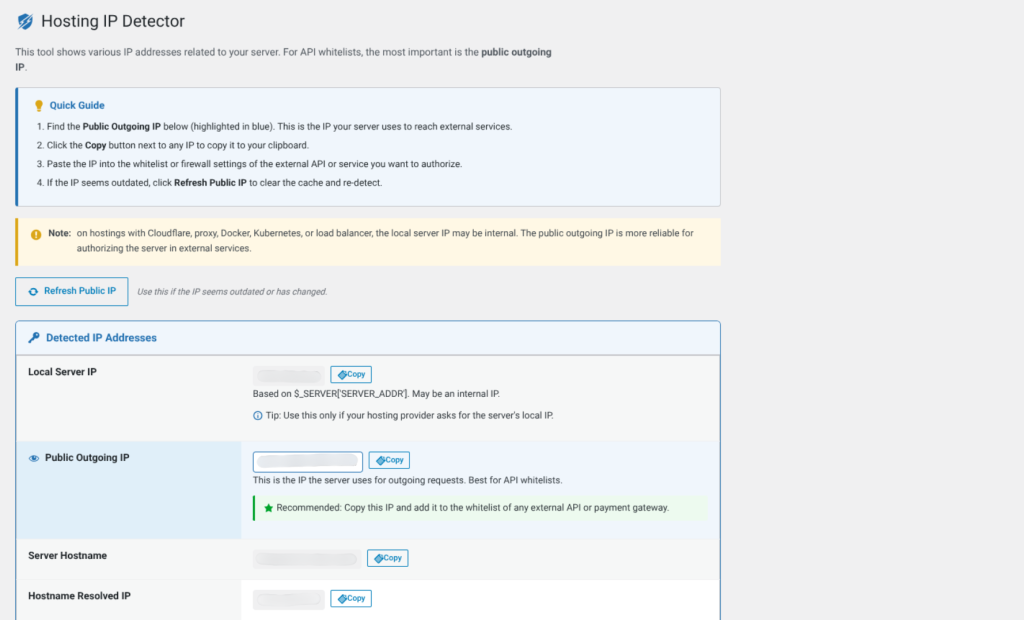
¿Necesitas whitelisting de IP en un firewall externo, API de terceros o servicio de hosting? Perder tiempo buscando la dirección IP correcta de tu servidor es una fricción innecesaria que ralentiza tu trabajo. [B] Hosting IP Detector resuelve esto en segundos: muestra tu IP local, hostname, IP pública saliente y registros DNS de tu dominio directamente en el panel de WordPress, sin necesidad de SSH, terminal o herramientas externas.
Este plugin es una herramienta de utilidad pura: accede a Herramientas → IP de Hosting y obtienes toda la información de red que necesitas en un único lugar, con botones para copiar al portapapeles y refrescar la caché en un clic. Ideal para desarrolladores, administradores de hosting y equipos técnicos que necesitan acceso rápido a datos de red sin abandonar WordPress. La seguridad está integrada: solo los usuarios con capacidad manage_options (administradores) pueden ver estos datos.
Ya sea que estés configurando integraciones de API, troubleshooting de conectividad, documentando tu infraestructura o simplemente necesites confirmar tu IP pública para un firewall corporativo, este plugin elimina la fricción. Funciona con cualquier hosting: desde servidores compartidos hasta Docker, Kubernetes, load balancers y Cloudflare. El plugin detecta automáticamente si estás detrás de un proxy y te muestra tanto la IP interna como la pública saliente para que siempre uses la correcta.
Construido con arquitectura orientada a objetos, cumple totalmente con los estándares de WordPress (WPCS), incluye protección AJAX con nonce, escapado de salida en todas partes y verificación de capacidades en cada punto de acceso. Soporte multiidioma incluido: español, portugués (Brasil) y gallego. Actualización automática integrada mediante el sistema de actualizaciones de Baqueiro, sin dependencias externas ni complejidad oculta.
La interfaz es limpia y responsiva: iconos de dashicons, diseño de tarjetas, accesibilidad WCAG 2.2 AA, y una guía rápida integrada con instrucciones paso a paso. Cada campo IP incluye consejos contextuales que explican cuándo usar cada dirección. Botón de actualización de IP pública con AJAX para refrescar la caché de 15 minutos sin recargar la página. Todo está pensado para que tu flujo de trabajo sea más rápido y más confiable.
Instalación de un clic, sin configuración requerida. Una vez activado, el plugin está listo. Perfecto para agencias que necesitan acceso rápido a datos de red en múltiples sitios, desarrolladores independientes que trabajan con varios clientes, y equipos de DevOps que integran WordPress en pipelines más amplios. Reduce el tiempo de troubleshooting, elimina llamadas de soporte innecesarias y centraliza la información de red donde ya trabajas: en WordPress.
Invierte 5 minutos en instalación y ahorra horas en troubleshooting y búsqueda de información. Pruébalo hoy: es ligero, seguro, y construido para durar.
Get to critical network data in one click from the WordPress dashboard. No more SSH, terminal or external tools. Cut troubleshooting time from minutes to seconds.
AJAX protection with nonces, capability checks at every point, complete output escaping. Only administrators can see the data. Meets WPCS and GDPR.
One click to copy any IP address, hostname or DNS record. Removes typing errors and speeds up whitelisting on firewalls and third-party APIs.
Works with shared hosting, Docker, Kubernetes, load balancers and Cloudflare. Automatically detects whether you are behind a proxy and shows both the internal and the public IP.
All the information you need in a single place inside WordPress. Reduces unnecessary support calls and improves infrastructure documentation.
Fully translated into Spanish, Portuguese (Brazil) and Galician. WCAG 2.2 AA compliant design. Works for international teams.
Hosting administrators need quick access to server IPs for troubleshooting, documentation and firewall setup. This plugin centralises that information in WordPress.
Developers who integrate third-party APIs often need to whitelist their server IP. Copying to the clipboard from the dashboard does it in one click.
When there are connectivity or firewall problems, you need to confirm your public IP quickly. The plugin does it without SSH or external tools.
Agencies and DevOps teams document the infrastructure of several sites. This plugin centralises network data in WordPress for quick reference.
Distributed teams without SSH access to the servers can use this plugin to get network information from the WordPress dashboard.
Upload the file to /wp-content/plugins/ or search for "[B] Hosting IP Detector" in Plugins → Add New. Activate it and it is ready.
Go to the WordPress dashboard, open the Tools menu and click "Hosting IP". You will see all your network information instantly.
Use the copy to clipboard buttons for each IP address, hostname or DNS record. Paste them directly into firewalls, APIs or documentation.
Click "Refresh public IP" to update the cache in real time. The plugin will detect your public IP again through AJAX.
Only administrators can see it, but you can give access to other team members by raising their role to administrator or giving them specific permissions.
Comparison with common alternatives
| Aspect | Hosting IP Detector | Other solutions |
|---|---|---|
| Outgoing public IP detected automatically | Yes, with a 15-minute cache | Requires an SSH terminal or external tools |
| Access from the WordPress dashboard | Yes, in Tools → Hosting IP | Requires command line access |
| Copy to clipboard in one click | Yes, for every value | Copy by hand from the terminal |
| DNS A/AAAA records included | Yes, detected automatically | Requires nslookup or dig in a terminal |
| Access restricted to administrators | Yes, with the manage_options capability | Unrestricted terminal access |
| Real-time AJAX cache refresh | Yes, built-in button | Requires running commands by hand |
| Technical information: web server, PHP SAPI, version | Yes, all included | Requires several commands |
Only users with the manage_options capability (administrators by default) can access the plugin page and see the data. It is fully protected and restricted to the WordPress admin dashboard.
On hosting with Cloudflare, a proxy, Docker, Kubernetes or load balancers, the local IP can be an internal address (such as 172.x.x.x or 10.x.x.x). Use the Outgoing public IP for whitelisting on external firewalls and third-party APIs. The plugin shows you both so you always use the right one.
Yes, the "Refresh public IP" button on the plugin page clears the transient cache and detects the IP again through AJAX in real time. The normal cache lasts 15 minutes to avoid excessive requests to external services.
The plugin makes outgoing requests to api.ipify.org and checkip.amazonaws.com to detect the outgoing public IP. No personal information is sent; only your public IP address is detected and cached locally in a WordPress transient. GDPR compliant.
Completely safe. The plugin implements AJAX protection with nonces, capability checks at every access point and output escaping everywhere, and it meets WPCS (WordPress Coding Standards). There are no external dependencies and no hidden complexity.
Yes, fully compatible with WordPress Multisite. Each subsite can access its own network information. Permissions are respected across the network.
Besides IPs and DNS, the plugin shows: web server (Apache, Nginx, etc.), PHP SAPI (CGI, FPM, CLI), PHP version and the current visitor's IP. Useful for troubleshooting and infrastructure documentation.
No, the plugin works automatically once activated. Go to Tools → Hosting IP and it is ready. No additional configuration is required.
Yes, the plugin is fully translated into Spanish (Spain), as well as Portuguese (Brazil) and Galician. Every string is fully translatable (i18n).
[ Keep exploring ]
Management and productivity
Real financial control for agencies, in your WordPress
License From €39/year
Management and productivity
A maintenance redirect that never locks you out. Secure by default.
License From €14/year
Management and productivity
From calendar to certificate — every event step handled, on your server.
License From €79/year