Audit-Ready Consent Proof
Every consent action is logged with a cryptographic snapshot of the exact banner the user saw — exportable to PDF in seconds if the AEPD comes knocking. You stop hoping your compliance holds up and start knowing it does.

[ Security and privacy ]
Complete RGPD, LOPDGDD & LSSI-CE compliance — built for Spain, runs on your server.
Every Spanish website that collects personal data is legally required to comply with the RGPD, the LOPDGDD, and the LSSI-CE — and the AEPD is actively sanctioning sites that fall short. Yet most WordPress site owners are still relying on a patchwork of free cookie banners, manually drafted legal pages that go stale, and zero documentation of what users actually consented to. When an inspection arrives or a user exercises their data rights, that patchwork unravels fast. The cost is not just a fine — it is the time, stress, and reputational damage of scrambling to prove compliance you never properly built.
[B] Easy RGPD & Cookies (España) is the only all-in-one WordPress plugin built specifically for the Spanish legal framework. It auto-creates your five mandatory legal pages from your company data, deploys an AEPD 2024-compliant cookie banner with granular category toggles and equal-hierarchy buttons, blocks third-party scripts before consent is given, scans your site for third-party cookies automatically, and records a cryptographically verifiable audit trail of every consent action — all without a single external SaaS subscription. Everything runs on your own server, under your own control, with no monthly fees for the compliance infrastructure itself.
Freelancers and agencies building sites for Spanish SMEs, law firms, e-commerce stores, healthcare providers, and public-sector clients will find this plugin covers the full compliance stack in one activation. WooCommerce stores using Google Analytics, Meta Pixel, or Stripe get script blocking and consent gating out of the box. Content sites embedding YouTube or Vimeo get placeholder replacements until the visitor grants marketing consent. Membership sites and lead-generation funnels get a structured ARCO+ rights form that accepts identity verification documents, stores them securely, and auto-deletes them when the request is closed — exactly as RGPD data minimization requires.
The plugin is built on WordPress 6.0+ and PHP 8.1+, tested up to WordPress 6.8, and designed to coexist peacefully with caching plugins, Elementor, Divi, and other page builders. The consent decision is evaluated client-side from a first-party cookie, so full-page caching never breaks the banner logic. The secure document upload zone uses .htaccess and web.config deny-all rules plus nonce-protected admin download links — no identity document is ever exposed via a public URL. IP addresses are stored only as a salted SHA-256 hash, satisfying the AEPD’s pseudonymization requirements while still proving consent uniqueness.
Managing compliance at scale stops being a burden when the audit trail does the work for you. Every consent action — accept, reject, customize, revoke — is logged with a canonical JSON snapshot of the exact banner the user saw: button text, category labels, accent color, locale, and a SHA-256 integrity hash. If the AEPD asks what banner version user X encountered on date Y, you can export a print-ready PDF of that specific consent record in seconds. The same PDF export covers individual ARCO+ rights requests with space for a signed response, and full consent logs by date range with action totals. No external dependencies, no third-party PDF service — pure semantic HTML rendered via @media print.
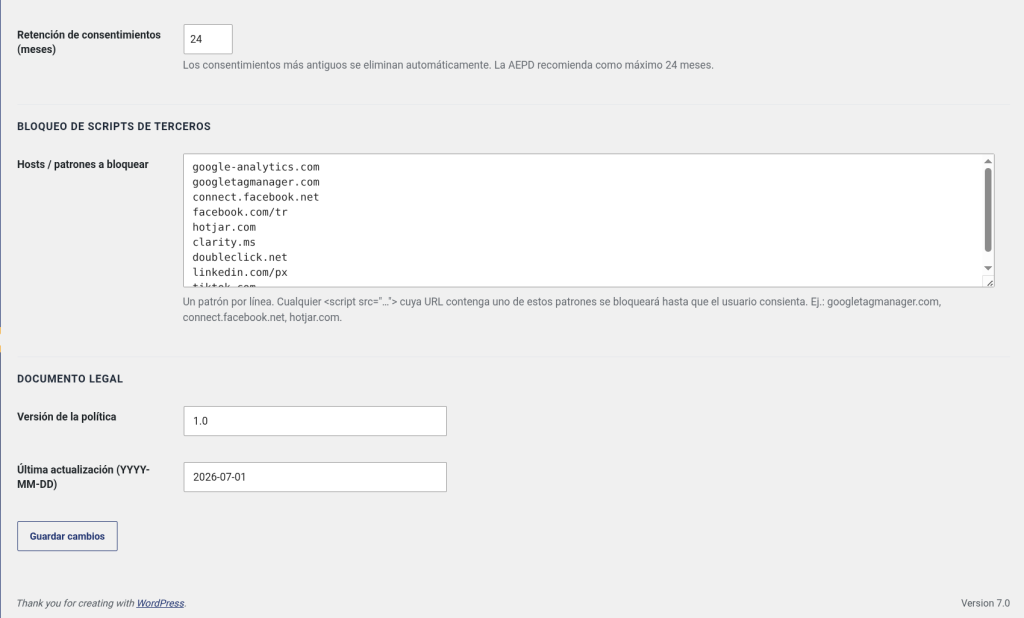
The automatic cookie scanner crawls your public URLs, cross-references a built-in catalog of over a dozen major third-party services — Google Analytics, Meta Pixel, Hotjar, Microsoft Clarity, LinkedIn Insight Tag, TikTok Pixel, YouTube, Vimeo, Cloudflare, Stripe, PayPal, and more — and proposes inventory rows and block-list entries without overwriting anything you have configured manually. Consent logs older than the configured retention period (default 24 months, the AEPD maximum) are purged automatically by a background cron job. You stay lean, compliant, and audit-ready without lifting a finger.
Compliance is not a one-time checkbox — it is an ongoing operational commitment. [B] Easy RGPD & Cookies gives you the infrastructure to meet that commitment confidently: structured processes for handling rights requests, documented proof of every consent, legally current page content you can restore in one click, and a plugin that is actively maintained against the latest AEPD guidance. Stop patching compliance together from free tools that were never designed for the Spanish legal framework. Deploy one plugin, cover the full obligation, and get back to building your business.
Every consent action is logged with a cryptographic snapshot of the exact banner the user saw — exportable to PDF in seconds if the AEPD comes knocking. You stop hoping your compliance holds up and start knowing it does.
Legal pages, cookie inventory, script blocking, and the rights form are all configured from a single panel. What used to take a lawyer, a developer, and a SaaS subscription now takes under ten minutes per site.
Unlike cookie consent platforms that phone home to their own infrastructure, this plugin runs entirely on your WordPress server. Your visitors' consent data stays under your control — no third-party processors, no additional DPA agreements required for the consent layer itself.
A structured, legally compliant workflow for access, rectification, erasure, portability, and objection requests — with secure identity verification, an internal resolution tracker, and auto-deletion of sensitive documents. Handling a rights request no longer means a panicked email chain.
The automatic scanner cross-references your live pages against a curated catalog of third-party services and surfaces what you are loading — so your cookie policy reflects reality, not wishful thinking. Fewer surprises during audits; fewer embarrassing gaps in your disclosure.
Agencies managing multiple client sites pay once per license tier, not per pageview or per consent. At €199/year for 25 sites, the cost per site is less than a single hour of legal consultation — and the compliance infrastructure is always on, always running.
The AEPD updates its guidance; the plugin is actively maintained to track those changes. Active license holders receive automatic updates with no manual intervention — so the banner logic, block list, and scanner catalog stay aligned with current requirements without you having to monitor regulatory news.
A Spanish e-commerce site running Google Analytics 4, Meta Pixel, and Google Ads conversion tracking needs to block all three before consent and fire them only when the visitor grants Analytics or Marketing consent. The plugin handles all three out of the box — no custom GTM triggers, no manual script wrapping, no risk of data being sent before the user decides.
A web agency with 15 client sites needs a repeatable, defensible compliance workflow without paying per-domain SaaS fees. The Agency license covers all 15 sites under one annual fee. Each site gets its own legal pages, its own consent log, and its own ARCO+ inbox — fully isolated, fully auditable, managed from each client's own WordPress admin.
A clinic or law firm collecting appointment requests and contact form submissions faces heightened scrutiny under the LOPDGDD due to the sensitivity of the data. The plugin's structured rights request workflow, secure identity document handling, and verifiable consent audit trail provide the documented processes these sectors need to demonstrate accountability to regulators and clients alike.
A membership site with registered users needs to handle access, portability, and erasure requests formally — not via ad-hoc email. The ARCO+ form gives members a self-service channel for all Art. 15–22 rights, the admin panel gives the site operator a structured queue to process them, and the PDF export provides a signed-response template that satisfies the one-month response requirement under RGPD Art. 12.
A news or blog site embedding YouTube videos and Vimeo clips throughout its content cannot legally load those embeds — which set third-party cookies — without prior marketing consent. The plugin automatically replaces all embeds with a branded placeholder until the visitor grants consent, then loads the actual embed on click. No shortcode changes, no manual template edits — it works with standard WordPress embed blocks.
Public institutions and nonprofits operating under Spanish law face the same RGPD obligations as commercial entities, often with less technical resource. The auto-created legal pages with one-click content restore, the structured rights form, and the zero-configuration cron-based retention purge mean compliance stays current without requiring ongoing developer involvement after initial setup.
Upload the plugin folder to /wp-content/plugins/ or install directly from your WordPress admin. Activate it — the plugin immediately creates your five legal pages and registers the database tables for consent logging and rights requests.
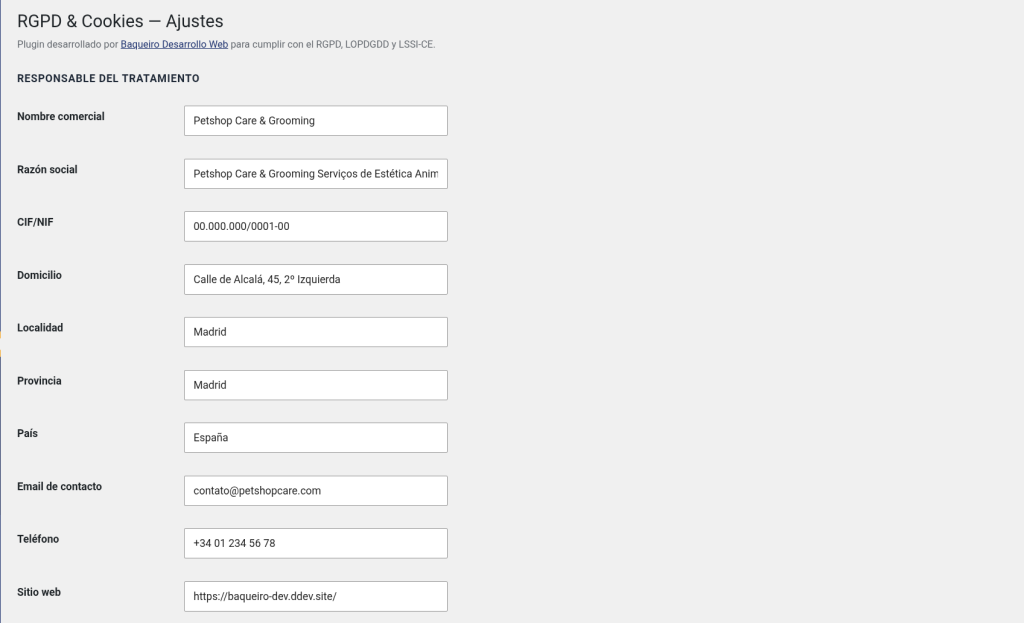
Go to RGPD → Settings and fill in your company name, CIF/NIF, registered address, contact email, and Data Protection Officer details if applicable. This information populates all five legal pages automatically — no copy-pasting into page editors.
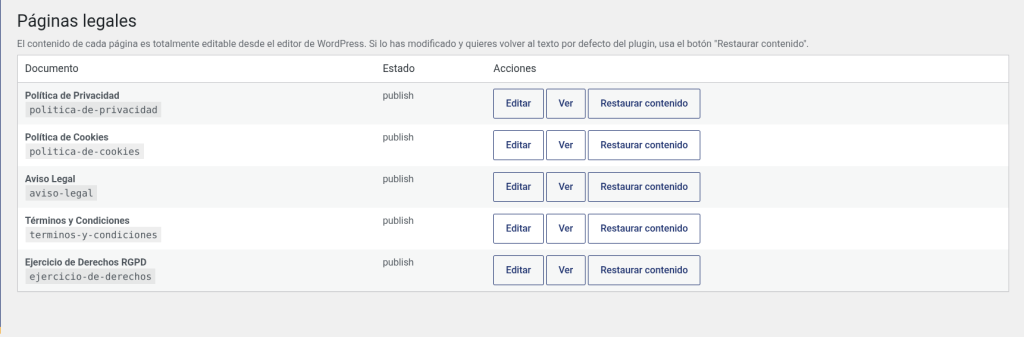
Visit RGPD → Legal Pages to review the auto-generated content and make any site-specific edits. Then go to RGPD → Cookie Scanner, run a scan of your public URLs, and review the proposed cookie inventory entries before publishing them to your Cookie Policy page.
In RGPD → Cookie Settings, set your accent color, confirm the categories you use, and review the pre-populated block list. Visit your site as a new visitor to verify the banner appears correctly and that blocked scripts are not firing in the browser console before consent is given.
Add [beasy_rgpd_rights_form] to your Rights Exercise page (already created and linked in the Privacy Policy). Test a submission end-to-end: submit a request, upload a test document, then process it from RGPD → Rights Requests in the admin panel and confirm the document auto-deletes on closure.
Go to RGPD → License, enter your license key, and activate your domain. You will immediately receive automatic update notifications through the standard WordPress updates panel, and premium features — cookie scanner and PDF export — will be fully unlocked.
Free plugins and generic cookie banners leave dangerous gaps in Spanish legal compliance. Here is exactly where they fall short.
| Aspect | Easy RGPD & Cookies (España) | Other solutions |
|---|---|---|
| AEPD 2024 equal-hierarchy button requirement | Fully implemented — Accept, Reject, and Configure at identical visual weight | Most free banners still use a prominent Accept button and a hidden or smaller Reject option, which the AEPD has explicitly sanctioned |
| Consent audit log with banner snapshot | Every record stores a canonical JSON snapshot of the exact banner shown, with SHA-256 hash for tamper detection | Generic plugins log a timestamp at best — no record of what the user actually saw or agreed to |
| ARCO+ rights request form with identity verification | Built-in form covering all Art. 15–22 RGPD types, secure document upload, admin workflow, and auto-delete on closure | Not included in any comparable free plugin; requires a separate form plugin, manual process, and no document security |
| Pre-consent script blocking (not just cookie deletion) | Scripts are prevented from executing before consent — tags never fire, no data is sent | Many tools delete cookies after the fact but cannot stop scripts from running and transmitting data on page load |
| PDF export for AEPD submissions | Print-ready PDFs for individual consents, individual rights requests, and date-range log exports — no external service | No PDF export capability in free alternatives; SaaS platforms charge extra or require manual screenshot workflows |
| Automatic cookie scanner with third-party service catalog | Crawls live URLs, detects 12+ major services, proposes inventory rows without overwriting manual entries | Free plugins require fully manual cookie inventory — no detection, no catalog, no proposed entries |
| No external SaaS dependency or per-consent pricing | Flat annual license — everything runs on your server, no data leaves your WordPress installation | Major consent platforms (Cookiebot, OneTrust, Axeptio) charge per domain or per pageview and process consent data on their own servers |
No. If a page with the same slug already exists (for example, politica-de-privacidad), the plugin reuses it and never overwrites its content. Pages auto-created by the plugin can be freely edited in the WordPress editor. The only time content is reset is when you explicitly click "Restore Default Content" inside the RGPD → Legal Pages panel — and even then, you get a confirmation prompt first.
Documents are stored in wp-content/uploads/beasy-rgpd-secure/{REQUEST_CODE}/ under a randomly generated 24-character filename. The directory is protected by an .htaccess file with Require all denied, a web.config with deny users="*", and a silent index.php. Downloads are only possible from the WordPress admin panel via a nonce + capability-checked AJAX endpoint. When a request is closed, the file is automatically deleted unless the administrator explicitly marks "Retain Document" — satisfying RGPD data minimization requirements.
No. The decision to show or hide the banner is made entirely in the browser based on a first-party consent cookie. The HTML served from cache is identical for all visitors; the banner visibility logic runs in JavaScript after page load. This means aggressive full-page caching does not interfere with the consent flow at all — the banner appears correctly for new visitors and stays hidden for returning visitors who have already consented.
No. Only a salted SHA-256 hash of the IP address is stored — it is not reversible and cannot be used to identify an individual. However, it is sufficient to demonstrate the uniqueness of each consent record if the AEPD requests proof. This approach aligns with the pseudonymization principle under RGPD Art. 4(5) and the AEPD's own guidance on consent logging.
The scanner crawls your public URLs server-side, detects third-party service references in the HTML, captures cookies sent via Set-Cookie headers, and cross-references a built-in catalog of over 12 major providers to propose the cookies those services typically set. It does not execute JavaScript, so cookies deposited by client-side scripts (such as _ga from Google Analytics or _fbp from Meta Pixel) are inferred from the catalog rather than observed directly. Human review of the proposed inventory before publishing is always recommended — the scanner is a productivity tool, not a substitute for due diligence.
No. The blocker only targets hosts explicitly listed in the block list — by default, known analytics and advertising third parties. Scripts belonging to your theme, page builder (Elementor, Divi, Beaver Builder, etc.), WooCommerce, or other essential plugins are never blocked. You can review and customize the block list at any time from RGPD → Cookie Settings → Block List.
Every consent record stores a canonical JSON object containing the exact button labels, category names and descriptions, accent color, interface locale, and plugin version that were active at the moment of consent — plus a SHA-256 hash of that JSON for tamper detection. If the AEPD audits your site and asks "what did user X see on date Y?", you can export a PDF of that consent record showing the rendered banner snapshot alongside the consent metadata. This is the level of documentation the AEPD's 2024 cookie guide implicitly requires for demonstrating valid, informed consent.
Yes. Go to RGPD → Settings → Cookie Banner and toggle the banner off. The legal pages, ARCO+ rights form, consent audit log, cookie inventory panel, and all shortcodes continue to work normally. This is useful if you are deploying the banner through a separate tool (such as a tag manager) but still want the plugin's legal page management and rights request workflow.
A WP-Cron job runs daily and deletes consent records older than the retention period configured in RGPD → Settings → Data Retention (default: 24 months, the AEPD maximum). The purge is logged in the WordPress debug log when WP_DEBUG_LOG is active. You can reduce the retention period at any time; you cannot set it above 24 months, which prevents accidental over-retention.
The plugin is designed and tested for standard single-site WordPress installations. Multisite (network) activation is not officially supported in the current version. Each subsite in a network would need the plugin activated individually at the site level. Full Multisite/network-admin support is on the roadmap for a future release.
By default, uninstalling the plugin removes only the plugin settings options and scheduled cron hooks. Consent logs, rights request records, and legal pages are preserved — because deleting audit records during an uninstall could itself constitute a compliance violation. If you want a full data wipe (for example, when decommissioning a site), you can enable it by adding the filter add_filter('beasy_rgpd_delete_data_on_uninstall', '__return_true'); before uninstalling. This will drop the database tables and delete the secure document upload directory.
A license covers one year of plugin updates and priority support. After expiration, the plugin continues to function with all features intact — nothing is disabled or removed from your site. You lose access to automatic updates and support until you renew. You will receive expiration warning notices in the WordPress admin starting 7 days before the renewal date, with a 3-day grace period after expiration before the warning becomes persistent.
[ Keep exploring ]
Security and privacy
Protection against malicious injections with no external contact and no loss of privacy
No cost Free
Security and privacy
Protect sensitive uploads. Block direct access. Keep public media.
License From €29/year
Security and privacy
The 404-pattern firewall that catches what generic security plugins miss.
License From €29/year