Know exactly where users click
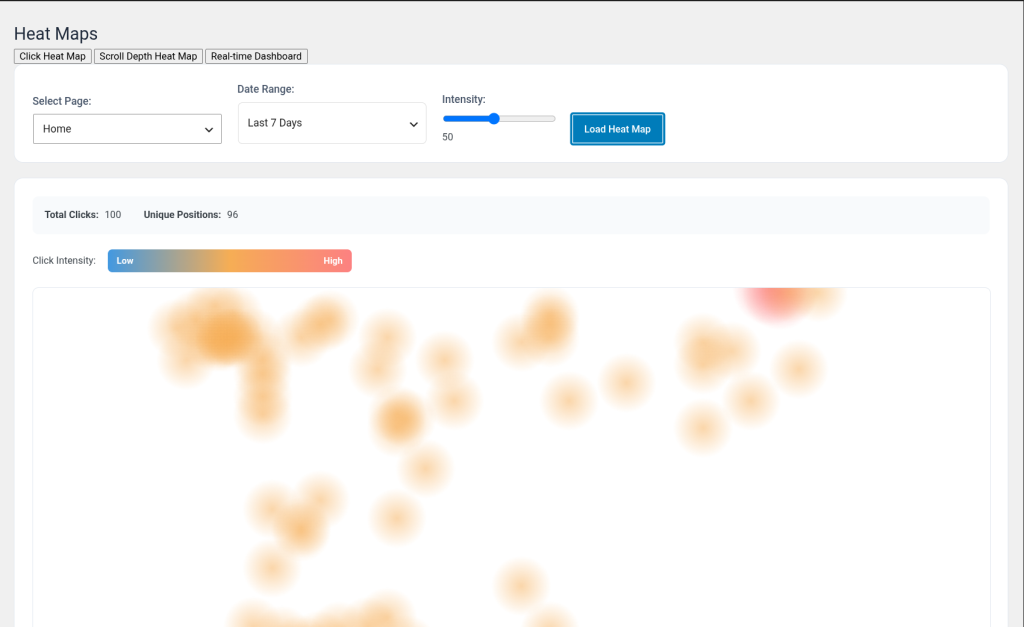
Stop guessing what grabs attention. The color-coded click heat map shows you precisely which elements users interact with on every page.

[ SEO and performance ]
See exactly where your visitors click, scroll and stop — right inside WordPress.
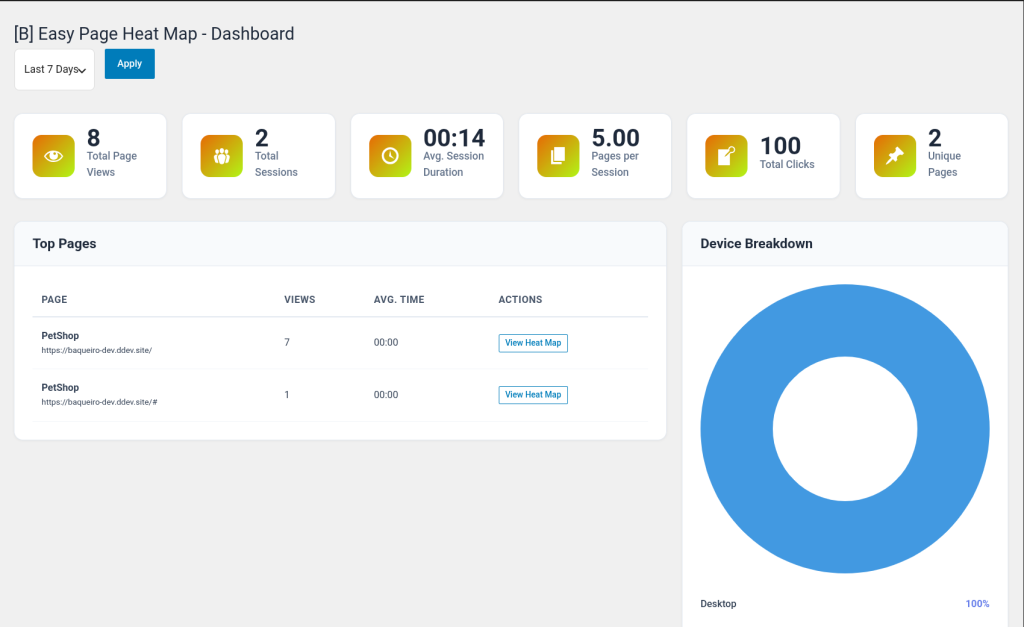
[B] Easy Page Heat Map gives you a crystal-clear visual picture of how real users interact with every page on your site — clicks, scroll depth, session behavior, device patterns, and live activity, all from your WordPress dashboard.
No external accounts. No data leaving your server. No monthly SaaS fees. Install, activate, and start seeing exactly where your visitors click, how far they scroll, and which content holds their attention.
Built for performance: every query uses prepared statements, data is stored locally in optimized tables, and the lightweight tracker script adds virtually zero overhead to your front end.
Stop guessing what grabs attention. The color-coded click heat map shows you precisely which elements users interact with on every page.
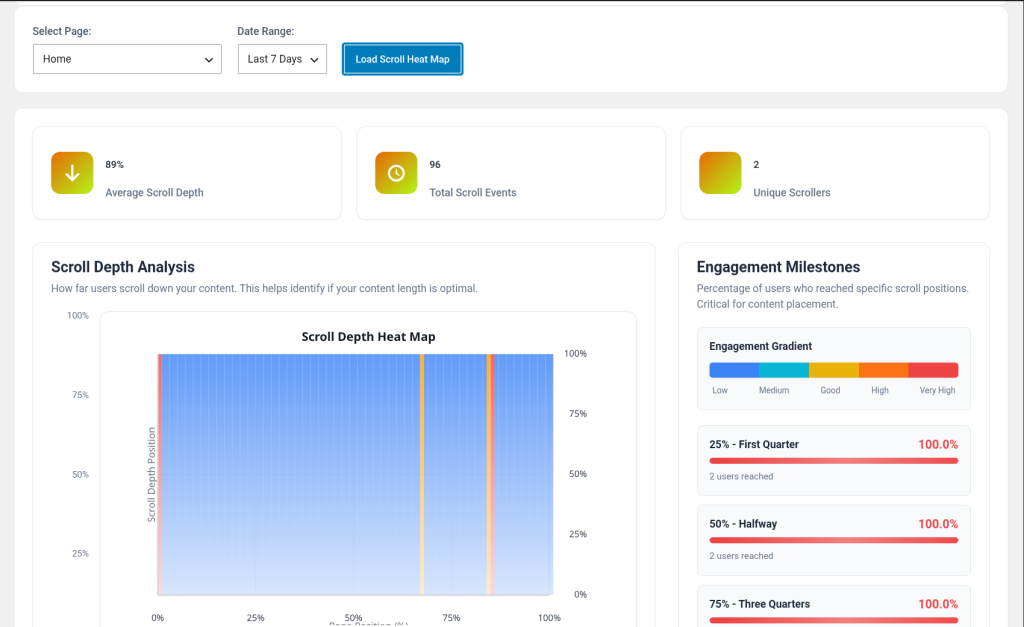
The scroll depth heat map and engagement milestones reveal the exact point where visitors lose interest — so you know where to improve your content.
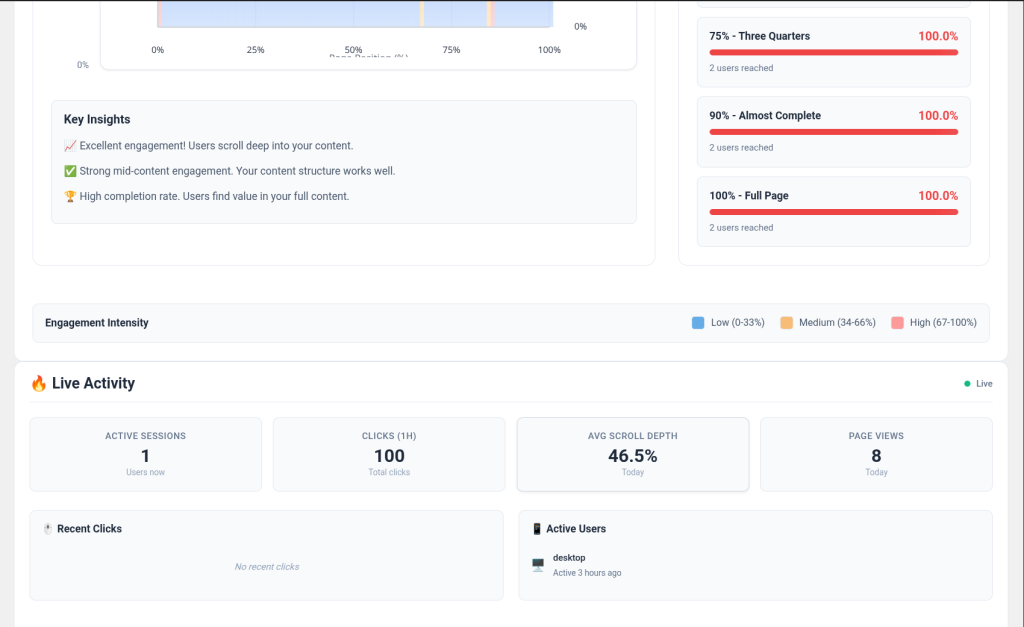
The real-time dashboard refreshes every 5 seconds showing active sessions, recent clicks and current scroll activity — no page reload needed.
Zero external dependencies. All tracking data is stored in your own WordPress database. No SaaS accounts, no monthly fees, no data sharing.
Consent banner, IP anonymization, user data export and deletion are all built in — no extra plugins or configuration needed to comply with GDPR.
Touch gestures, swipe patterns and device-specific behavior are tracked separately so you can optimize the experience for every screen size.
Identify which product images, CTAs and add-to-cart buttons get the most clicks. Find where shoppers abandon the checkout flow using scroll depth data.
See exactly how far visitors scroll before leaving, which headline gets attention and whether your CTA is in the right position to convert.
Discover which sections of your articles readers actually finish. Use scroll milestones to decide where to place related posts, newsletter opt-ins or affiliate links.
Show clients concrete behavioral data from their visitors. Back up UX recommendations and redesign proposals with real heat map evidence instead of assumptions.
Understand touch and swipe patterns from mobile visitors. Separate device breakdowns let you optimize navigation and layout for each screen size independently.
Track how students engage with lesson pages. Scroll depth milestones reveal which courses hold attention and which content needs to be restructured or shortened.
Upload the plugin via Plugins > Add New or install directly from the WordPress plugin directory. Activate it with one click — database tables are created automatically.
Go to [B] Heat Map > Settings. Enable tracking, set your data retention period, configure GDPR consent if needed, and choose whether to track logged-in users or administrators.
The lightweight tracker script is automatically injected into your front end. Clicks, scroll events and sessions start being recorded immediately for any page your visitors access.
Go to [B] Heat Map > Heat Maps, select a page and a date range, then click Load Heat Map. Switch between the click heat map, scroll depth analysis and real-time dashboard tabs.
Use the Dashboard for an overview of sessions, page views, device and browser breakdown. Use Sessions to review individual visitor sessions in detail.
See how it compares to typical SaaS heat map tools
| Aspect | Easy Page Heat Map | Other solutions |
|---|---|---|
| Data ownership | 100% on your server | Stored on third-party servers |
| Monthly SaaS fee | None — one annual license | $29 to $249/month |
| GDPR consent banner | Built in | Often requires separate plugin |
| Real-time dashboard | Yes — 5 second refresh | Usually paid add-on |
| Scroll depth heat map | Yes — with milestone bars | Yes, on higher plans |
| Touch and gesture tracking | Yes — swipe, pinch, tap | Limited or unavailable |
| WordPress native integration | Full — REST API, WP hooks, options | External script snippet only |
| Data retention control | Configurable — 1 to 365 days | Fixed by plan |
| No page speed impact | Async REST API tracking | Varies — often adds render-blocking scripts |
No. Every click, scroll event, and session is stored exclusively in your own WordPress database. Nothing is sent to third-party servers.
Yes. The plugin includes a built-in consent banner, optional IP anonymization, data export, and one-click data deletion per user — covering the main GDPR requirements for analytics tools.
No. The front-end tracker is a single lightweight JavaScript file. Tracking calls are made asynchronously via the WordPress REST API so they never block page rendering.
Yes. The plugin tracks interactions on any WordPress page regardless of how it was built — with Elementor, Divi, Gutenberg, or custom themes.
Yes. The plugin includes full touch and swipe gesture tracking for mobile and tablet visitors, with separate device breakdowns in the analytics dashboard.
Yes. You can exclude administrators, all logged-in users, or specific user roles from tracking in the plugin settings.
By default 90 days. You can configure the retention period in Settings, and the plugin automatically cleans up old data daily via WP-Cron.
If you enable the "Delete all data on uninstall" option in Settings, all database tables and options are removed when you delete the plugin. Otherwise your data is preserved.
The plugin is compatible with standard WordPress installations. Multisite support is planned for a future release.
PHP 8.1 or higher is required. The plugin will display an admin notice and stop loading gracefully if an older PHP version is detected.
[ Keep exploring ]
SEO and performance
Streamline Your Media Library, Boost Performance
License From €29/year
SEO and performance
Find broken URLs and recover 404 traffic with smart WordPress redirects
License From €29/year
SEO and performance
Automatic WebP/AVIF with responsive delivery and LCP optimisation
License From €29/year