Save dozens of hours every month
No more manual exports, copy and paste or slow conversions. One click, a few seconds of waiting, file ready. Automate repetitive tasks and focus on growing.

[ WooCommerce ]
Excel for WooCommerce. Fast, secure, no size limits.
Works with WooCommerce
Gestionar un catálogo WooCommerce grande es complejo. Necesitas enviar datos de productos a proveedores, sincronizar inventario con sistemas externos, crear informes para análisis, o hacer copias de seguridad regulares. Los métodos manuales consumen horas. Los plugins genéricos son lentos o caros. Exportar 10.000 productos debería ser trivial, no una odisea.
[B] Woo XLS Exporter resuelve esto de forma elegante. Selecciona exactamente qué columnas necesitas de más de 30 campos disponibles, organiza el export con un clic, y recibe un archivo Excel (.xlsx) perfecto en segundos. El plugin usa procesamiento en lotes AJAX para manejar catálogos masivos sin bloquear tu servidor ni agotar memoria. Funciona con 100 productos o 100.000 igual de rápido.
Ideal para tiendas en crecimiento, agencias que gestionan múltiples clientes, o negocios que necesitan integración constante con herramientas externas. Exporta precios, inventario, descripciones, imágenes, variaciones, taxonomías, fechas de creación, y mucho más. Cada export es un archivo limpio, estructurado, listo para importar a cualquier sistema, compartir con tu equipo, o analizar en Power BI.
La seguridad está integrada desde el inicio. Endpoints AJAX protegidos con nonces, validación de capacidades, sanitización de entradas, y escapes de salida siguiendo estándares WordPress. Los archivos export se limpian automáticamente después de 2 horas mediante WP-Cron, sin ocupar espacio en tu servidor de forma indefinida. Compatible con WordPress 6.0+, PHP 8.1+, y WooCommerce 7.0+.
No requiere librerías externas ni dependencias complejas. El plugin usa la extensión ZipArchive nativa de PHP para generar archivos .xlsx auténticos, no conversiones pobres. Esto significa compatibilidad total con Excel, Google Sheets, LibreOffice, y cualquier herramienta que lea estándares OOXML. Tus datos son portátiles, nunca quedan atrapados.
Ahorra decenas de horas cada mes en tareas repetitivas. Automatiza exports diarios, integra con webhooks o scripts externos, o simplemente reduce el tiempo manual de gestión de catálogo. El equipo de Baqueiro Desarrollo Web está detrás de cada actualización, con soporte en español y compromiso con la calidad del código. Esto no es un plugin abandonado: es herramienta profesional construida para durar.
No more manual exports, copy and paste or slow conversions. One click, a few seconds of waiting, file ready. Automate repetitive tasks and focus on growing.
Protected with nonces, capability checks and automatic clean-up. Your product data is never sent to third parties. Compatible with any tool that reads Excel.
Processes 30,000+ products without blocking your store or running out of memory. Automatic batches, a progress bar and a download in seconds. Your server stays relaxed.
Select exactly what to export: prices, inventory, descriptions, images, variations, taxonomies. Create custom exports for each use case with no code.
The Baqueiro team is behind every update. Email, chat and, for Agency customers, phone 24/5. Fast answers, practical solutions, in your language.
Export SKUs, quantities and cost prices regularly. Share them with suppliers or warehouse management systems. Keep data up to date without complex integrations.
Extract complete data to Excel or Power BI. Analyse price trends, image coverage and category distribution. Make decisions based on real data.
Back up your catalogue to Excel regularly. Make migrations to other platforms easier. Protect your investment in product content.
Share exports with marketing, design or finance. Everyone sees consistent, up-to-date data in a familiar format. Reduce information silos.
Export your catalogue for Amazon, eBay or your own platforms. Prepare the data in the format each channel requires. Scale without losing consistency.
Upload [B] Woo XLS Exporter through Plugins > Add New, or upload the folder to /wp-content/plugins/. Activate it. It will appear under WooCommerce > Export to Excel.
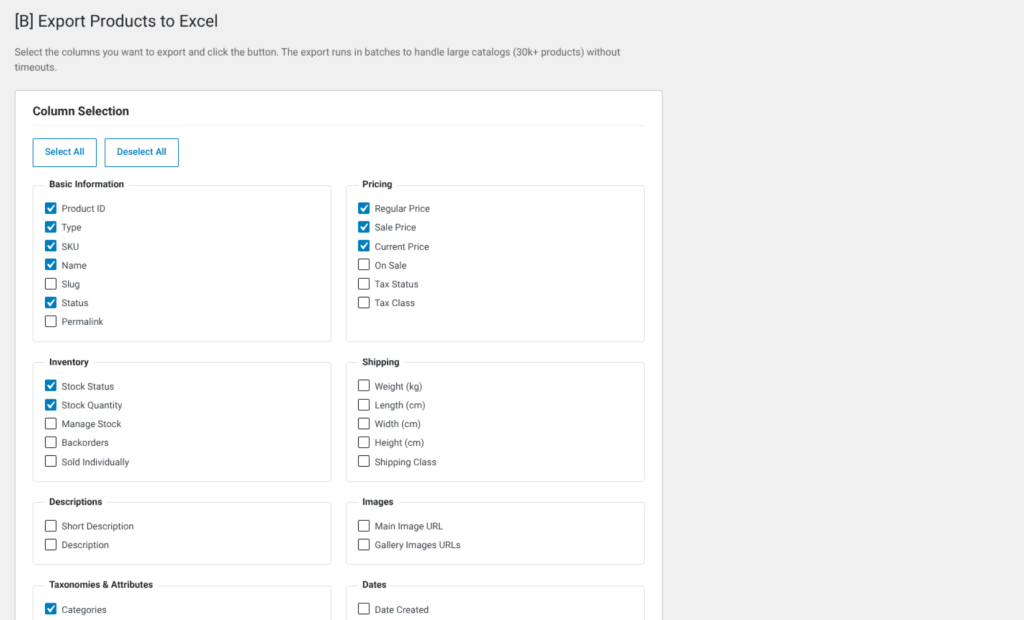
Tick the fields you want to export: basic, prices, inventory, descriptions, images, etc. Tick "Include variations" if you need it. Customise each export with no code.
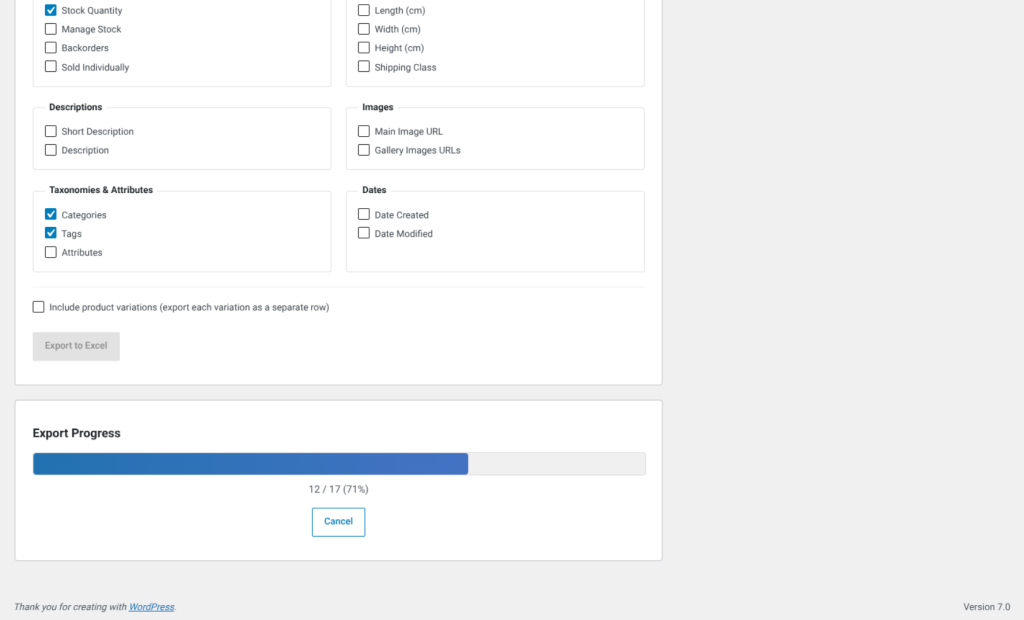
Click "Export to Excel". The plugin will process your catalogue in automatic batches. You will see a real-time progress bar. Wait until it reaches 100%.
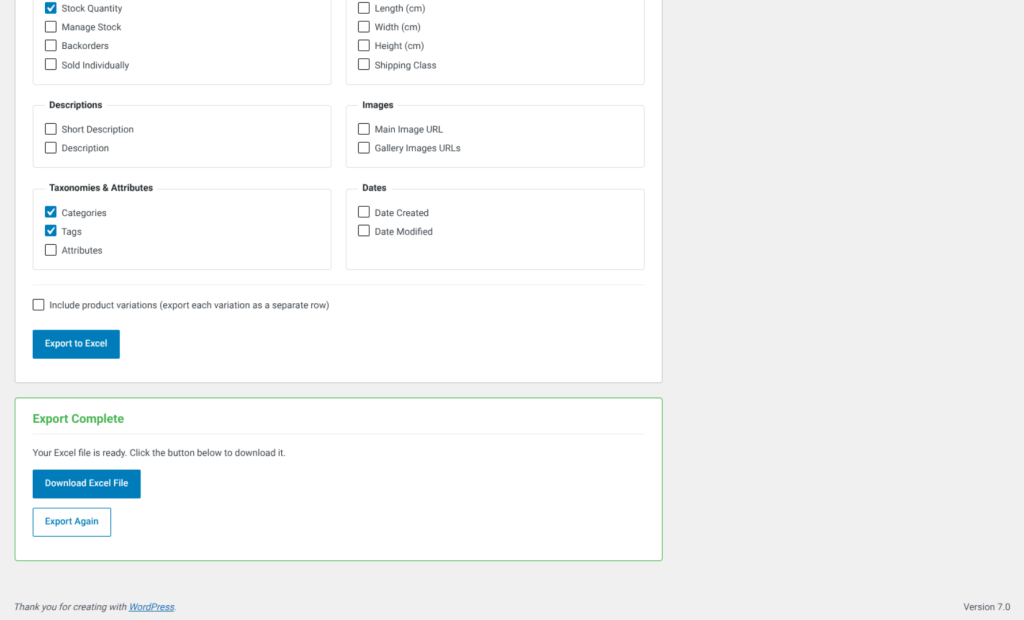
When it finishes, download the .xlsx file. Open it in Excel or Google Sheets, or import it into your favourite tool. The data is ready, structured and portable.
A clear comparison with common alternatives
| Aspect | Woo XLS Exporter | Other solutions |
|---|---|---|
| Handling of 30k+ catalogues | AJAX batches, no practical limit | Often fails or slows down |
| Granular column selection | 30+ fields, grouped by category | Exports all or nothing |
| Includes variations | Yes, as separate rows | Requires extra setup |
| Genuine .xlsx files | Native ZipArchive, no external APIs | Often CSV or poor conversions |
| Support in Spanish | Email, chat, phone (Agency) | Generic global support |
| Fair price, no hidden subscription | From €49/year, transparent | Freemium with aggressive limits |
Yes, with no practical limits. The plugin processes products in batches of 200 through AJAX, keeping the memory footprint low. We have tested it with catalogues of 50,000+ products without problems. Only your server and PHP matter. If your hosting can serve WordPress, it can export with this plugin.
Minimum: WordPress 6.0+, PHP 8.1+, WooCommerce 7.0+ and the ZipArchive extension enabled (it is on by default on almost every hosting). We recommend PHP 8.2+ and at least 256 MB of memory_limit. Check it under Tools > Site Health in WordPress.
Yes, optionally. Tick the "Include product variations" box on the export page and each variation will appear as a separate row in the Excel file. Useful for syncing prices per variant, granular inventory or detailed analysis. If you leave it unticked, only parent products are exported.
Files are cleaned up automatically after 2 hours through WP-Cron. Download it right after the export. If you need to keep it longer, save it locally. The files are stored in /wp-content/uploads/b-woo-xls-exporter/ and do not take up space indefinitely.
More than 30 fields organised into categories: Basic (ID, name, slug, status), Prices (regular price, sale price, cost price), Inventory (quantity, stock status, SKU), Shipping (weight, dimensions), Descriptions (short description, full description), Images (featured image URL), Taxonomies (categories, tags, attributes), Dates (created, modified). Select only what you need.
Completely secure. We use nonces on every AJAX endpoint, capability checks (only administrators can export), input sanitisation and output escaping following WordPress standards. Files are generated locally and never sent to external servers. The automatic clean-up deletes data after 2 hours.
Yes, fully compatible. Each site in the network can export its own catalogue independently. Files are stored per site in their corresponding upload directories. Perfect for agencies that manage several stores.
For now, exports are manual from the admin interface. In future versions we will explore webhooks and a REST API. If you need automation urgently, contact support: we can explore custom solutions.
The plugin is designed to be resilient. If something fails, the error appears in the progress bar. You can retry the export without problems. Temporary files are cleaned up automatically, so nothing is left behind. If you get a recurring error, contact support.
[ Keep exploring ]
WooCommerce
Keep out-of-stock products visible and capture direct requests
License From €29/year
WooCommerce
Manage thousands of WooCommerce products without timeouts or interruptions
No cost Free
WooCommerce
Automatic tax ID validation for your Spanish checkout
License From €29/year