Never lose interested customers
Out-of-stock products stay visible in your catalogue. Customers looking for what they want find it and sign up, and you get real demand data for restock decisions.
[ WooCommerce ]
Keep out-of-stock products visible and capture direct requests
Works with WooCommerce
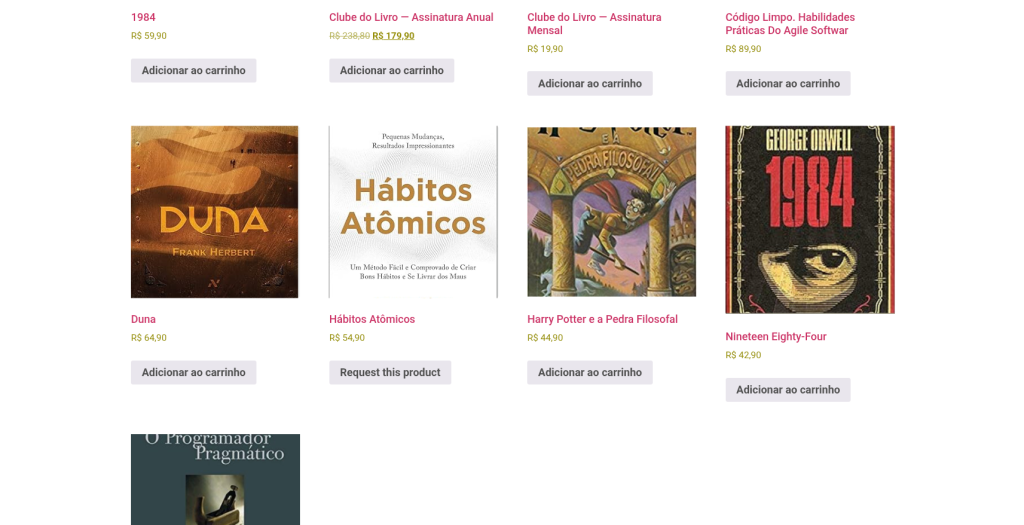
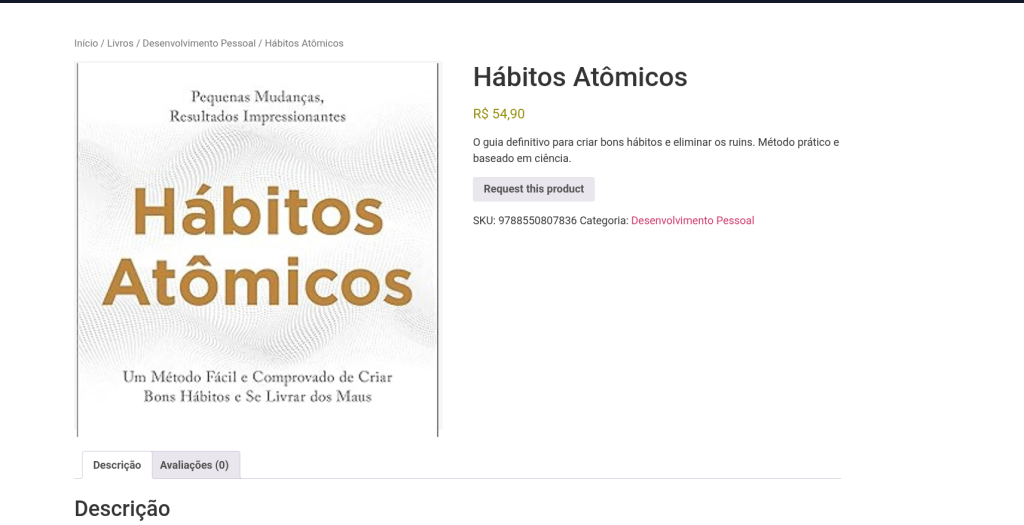
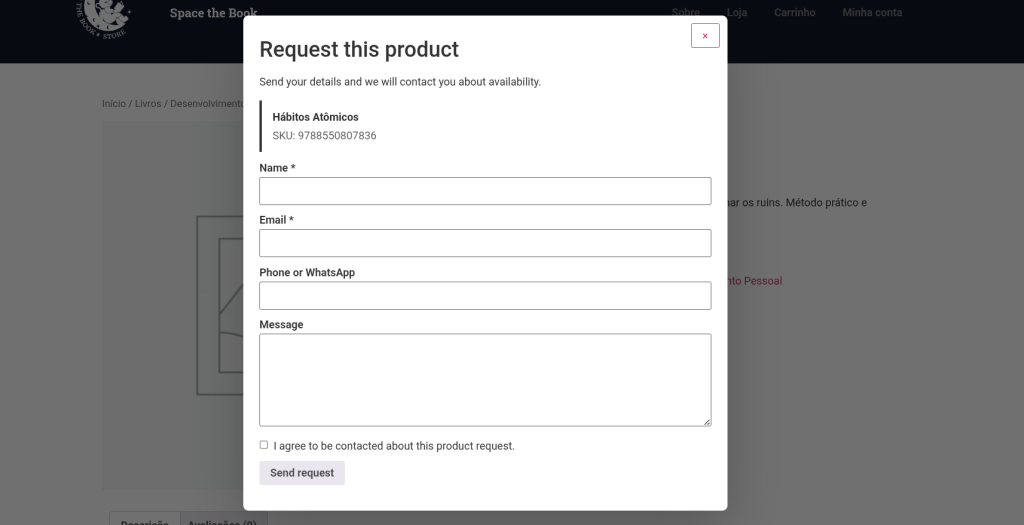
Out-of-stock products often disappear from your WooCommerce catalog, which means missed sales opportunities, frustrated loyal customers, and money left on the table. When a customer can’t find what they’re looking for, they simply go to the competition. [B] Product Request for WooCommerce solves this problem by keeping your out-of-stock products visible across your whole catalog, while replacing the buy button with a professional request flow that turns interest into valuable business data.
The plugin works elegantly and without complications. Out-of-stock products stay visible in categories, searches, and filters. When a customer tries to buy, instead of seeing a “Not available” message, they find a request button that opens a modal form or a dedicated page. The customer fills in their details, the form is submitted, and you receive an email notification with all the details. Optionally, you can offer a direct WhatsApp button for quick inquiries. Every request is saved as a private record in your WordPress admin, creating a complete history for analysis and follow-up.
This approach benefits stores of all sizes. Fashion stores can capture interest in last-season garments. B2B distributors can collect requests from corporate customers for special orders. Collectibles stores can keep limited editions visible and record demand for future reprints. Sports equipment sellers can ask customers to sign up for restock alerts. Any business with fluctuating inventory or products with irregular availability cycles gets a built-in demand-capture system, with no need for external tools.
The plugin is built for compatibility, reliability, and compliance. It works with WooCommerce 7.0 and above, WordPress 6.0, and PHP 8.1, ensuring it runs without conflicts on most modern installations. It includes full GDPR support with built-in privacy exporters and erasers, automatic data retention handling, and has been thoroughly tested with WOOF and other popular filter builders. Installation is instant: the plugin automatically creates a request page on activation, sets up the email notifications, and provides a shortcut to its settings from the WooCommerce menu.
It scales without friction. As your business grows, the plugin handles hundreds of requests without slowdowns. Request records are stored securely in your WordPress database, with no external dependencies or API quotas. The automatic retention system can clean up old requests according to your privacy policy. The customer confirmation email is optional, reducing noise while keeping customers informed. Admin notifications include all the information you need to act: product name, SKU, customer details, and a direct link to the request record.
Your customers deserve a frictionless experience when they express interest. Instead of a “Not available” dead end, you offer them a clear way to get in touch. The modal flow lets customers submit a request without leaving the product page, keeping context and reducing friction. The form is clean, fast, and respects the customer’s time. Optionally, it shows a WhatsApp button for immediate inquiries, with smart placeholders that prefill the product name, SKU, URL, and customer details. Your customers feel heard, and you get actionable data to drive inventory, restocking, and marketing decisions.
Start today and turn out-of-stock products from a pain point into a growth opportunity. With [B] Product Request for WooCommerce, every dissatisfied customer becomes a registered lead, every search with no result becomes demand data, and every interaction strengthens the relationship with your audience. Don’t wait for the competition to capture that opportunity.
Out-of-stock products stay visible in your catalogue. Customers looking for what they want find it and sign up, and you get real demand data for restock decisions.
Every request is recorded as a permanent record. Analyse demand patterns, identify popular products and make inventory decisions based on data, not assumptions.
The modal flow keeps customers in context. Without leaving the product page, they express interest and connect with you. No complications, no redirects, no loss of momentum.
Built-in GDPR, native privacy exporters, automatic data retention and a cart lock that prevents fraudulent purchase attempts on products without stock.
Access to support by email and chat from Monday to Friday. Security and feature updates included in your subscription. No surprises, no hidden costs.
Keep last season's garments, limited editions and sold-out sizes visible. Capture interest from loyal customers for future reorders and restocks. Create waiting lists without external tools.
Record requests from corporate customers for special orders, large volumes or discontinued products. Keep relationships with potential buyers active and build a demand pipeline.
Keep figures, comics and limited edition items visible even when they are sold out. Capture demand for future reprints, special editions and related releases. Build a community around rare products.
Record customer requests for sold-out equipment, special sizes or discontinued models. Use the data to decide which products to restock, and notify interested customers when they are available again.
Keep artisan, imported or seasonal products visible even when they are sold out. Capture customer interest for future batches, custom production or pre-orders.
Upload the plugin to /wp-content/plugins/ or install the ZIP from Plugins > Add New > Upload Plugin. Activate it from the plugins screen. The plugin automatically creates the request page.
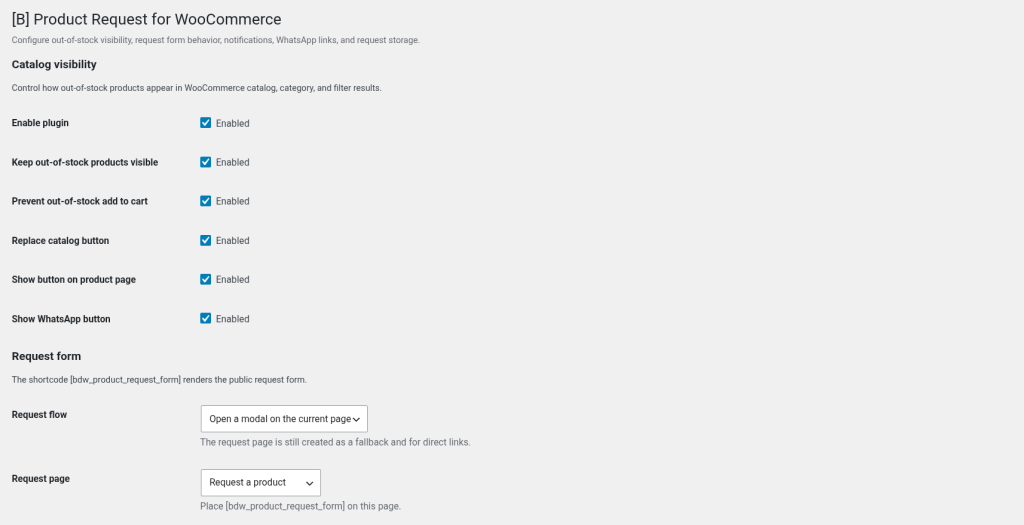
Go to WooCommerce > [B] Product Request. Confirm the request page, set the administrator notification email, add your WhatsApp number (optional) and turn on cart protection. It takes less than 5 minutes.
If you use WOOF or another filter builder, rebuild the indexes from its dashboard so it detects that out-of-stock products are now visible. It is a one-off operation.
Receive email notifications when customers send requests. Review the records in WooCommerce > [B] Product Request > Requests. Contact customers, restock popular products and make inventory decisions based on real data.
Comparison with common alternatives
| Aspect | Product Request for WooCommerce | Other solutions |
|---|---|---|
| Keeps out-of-stock products visible in the catalogue | Yes, automatically in every WooCommerce query | Requires additional plugins or manual setup |
| Built-in request form | Yes, modal or dedicated page, no external dependencies | Requires Gravity Forms, WPForms or third-party tools at extra cost |
| Record of requests in WordPress | Yes, native private posts with search and export | External storage or manual integration with CRM services |
| WhatsApp integration with dynamic placeholders | Yes, included, with {product_name}, {product_sku}, {customer_email}, etc. | Requires a separate WhatsApp plugin or manual URL setup |
| Automatic cart lock for out-of-stock products | Yes, built-in protection against purchase attempts | Not included, requires custom logic or additional plugins |
| GDPR and native privacy exporters | Yes, full integration with the WordPress Privacy Tools | Manual compliance or third-party services |
| Price and license model | €29, one-time payment per site, no API fees | Several subscriptions, fees per email sent or custom development costs |
No. The plugin keeps the products visible but does not mark them as in stock or make them purchasable. The purchase button is replaced by the request button. If a customer tries to add an out-of-stock product to the cart directly (through a URL, hacks or API requests), the plugin blocks it automatically when cart protection is turned on.
Yes. The plugin forces the WooCommerce catalogue option to "show out-of-stock products" and removes common visibility exclusions of out-of-stock products from the WooCommerce queries. After activating the plugin, you must rebuild the WOOF filter indexes (or those of any other filter builder you use) so it detects the new state of the catalogue. This is a one-off operation and takes less than a minute.
The plugin automatically creates a "Request a product" page on activation. You can change this page in Settings > [B] Product Request, or use the shortcode [bdw_product_request_form] on any page you prefer. The form also appears in a modal on individual product pages if you set the flow to "Open a modal on the current page".
Yes. Set the Request flow to "Open a modal on the current page" in the plugin settings. The modal opens over the current content, letting customers complete the request without navigating away. The dedicated request page is still available as an alternative for users without JavaScript or for direct links.
No. When cart protection is turned on (the recommended option in Settings > [B] Product Request), direct attempts to add products without stock to the cart are blocked automatically. This includes AJAX requests, direct add-to-cart URLs and any other method. Only products in stock can be added to the cart.
Yes. The plugin includes complete translation files for Galician (gl_ES), ready to use. If your site is set to Galician, the plugin is translated automatically.
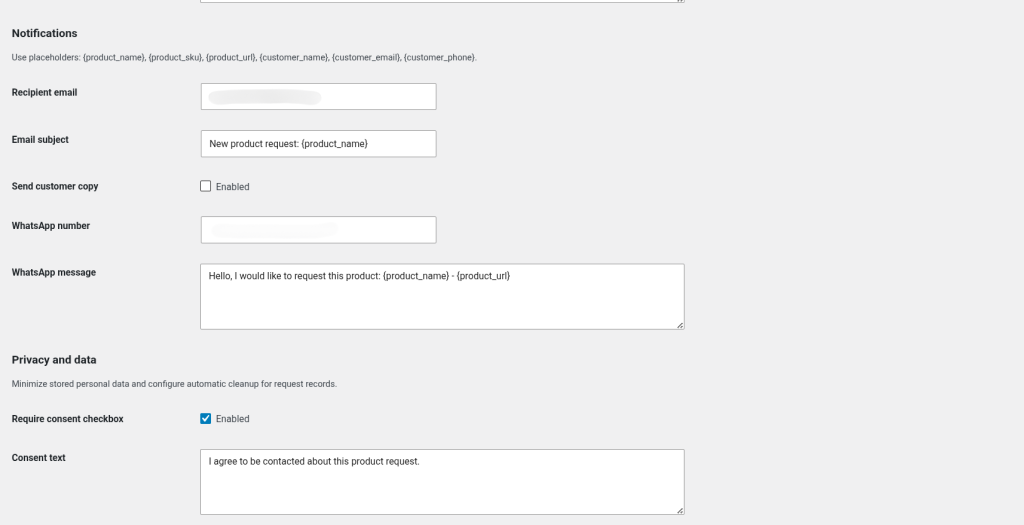
Yes. Set the WhatsApp number and message in Settings > [B] Product Request. You can show both the form button and the WhatsApp button on the product page. The WhatsApp message supports dynamic placeholders such as {product_name}, {product_sku}, {product_url}, {customer_name}, {customer_email} and {customer_phone}, which are filled in automatically with the available data.
You can use the following placeholders anywhere in the message: {product_name} (product name), {product_sku} (SKU code), {product_url} (direct link to the product), {customer_name} (customer name, if available), {customer_email} (customer email) and {customer_phone} (customer phone). The plugin automatically replaces these placeholders with the real values when the customer clicks the WhatsApp button.
Every request is stored as a private post (post type: bdw_product_request) in your WordPress database. They appear in the admin menu under WooCommerce > [B] Product Request > Requests. Each request includes the customer's name, email and phone, the requested product, SKU, URL and the custom message. The records are completely private and do not appear on the front end.
Yes. The plugin includes native WordPress privacy exporters and erasers. When a user requests the export or deletion of their personal data, the plugin automatically includes/deletes their requests. It also includes an automatic retention system that can clean up old requests according to your privacy policy (configurable in days). All data storage happens on your server, with no external dependencies.
No. The plugin is configured entirely from the WordPress admin. After activating it, go to WooCommerce > [B] Product Request and you will see every option: request page, email notifications, WhatsApp number, WhatsApp message, cart protection and data retention. Everything is available through simple visual controls. No code required.
[ Keep exploring ]
WooCommerce
Manage thousands of WooCommerce products without timeouts or interruptions
No cost Free
WooCommerce
Excel for WooCommerce. Fast, secure, no size limits.
License From €29/year
WooCommerce
Automatic tax ID validation for your Spanish checkout
License From €29/year