Complete automation that saves hours
Forget manual membership management. The plugin handles expiry, renewal, discounts and reminders automatically. Your team focuses on growing, not on admin.

[ WooCommerce ]
Automated membership clubs, automatic discounts, recurring revenue—no manual work.
Works with WooCommerce
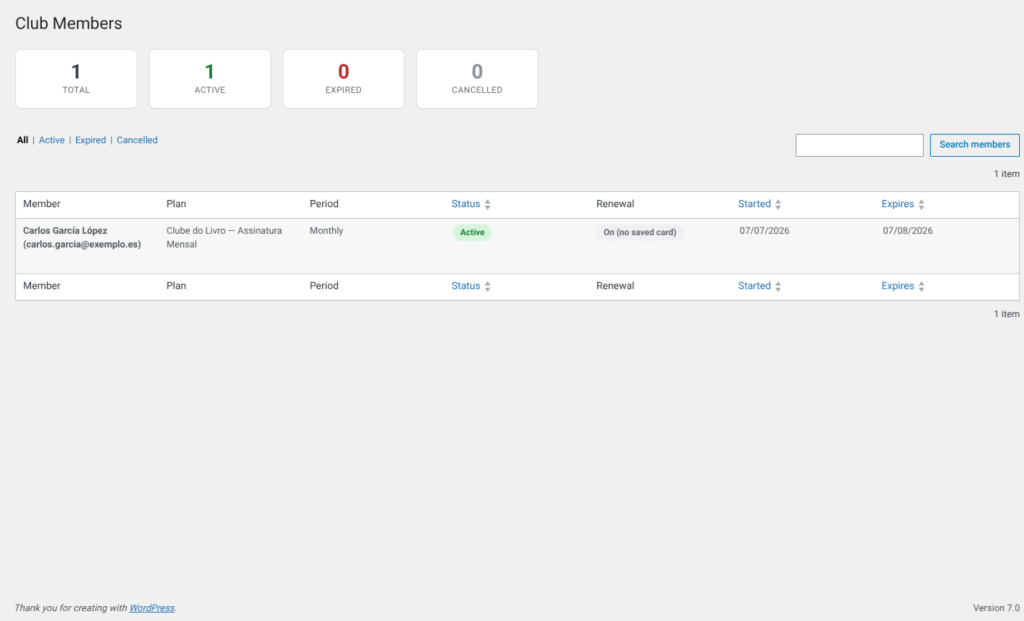
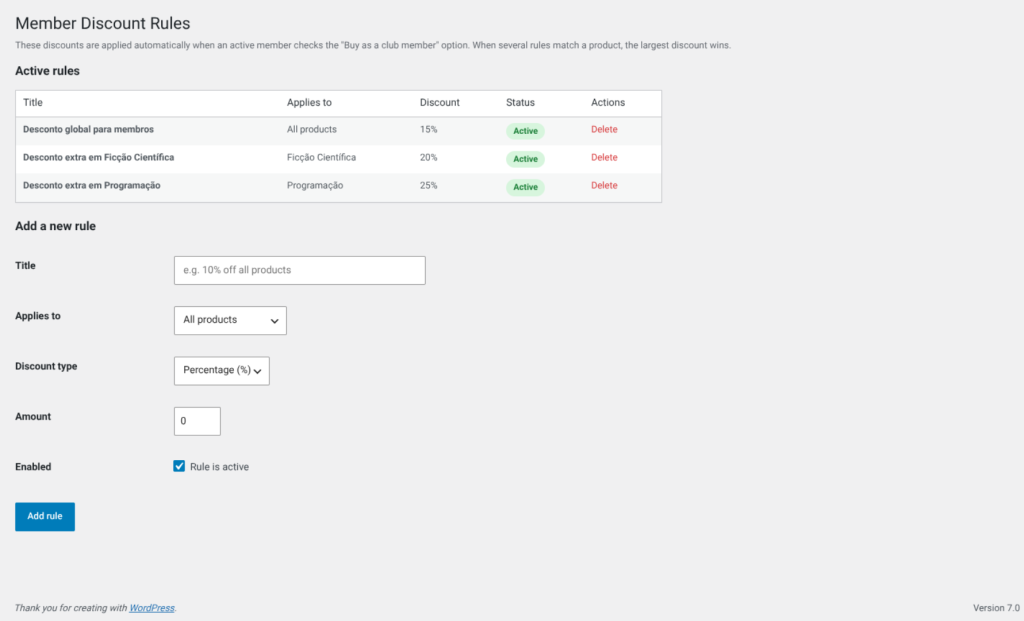
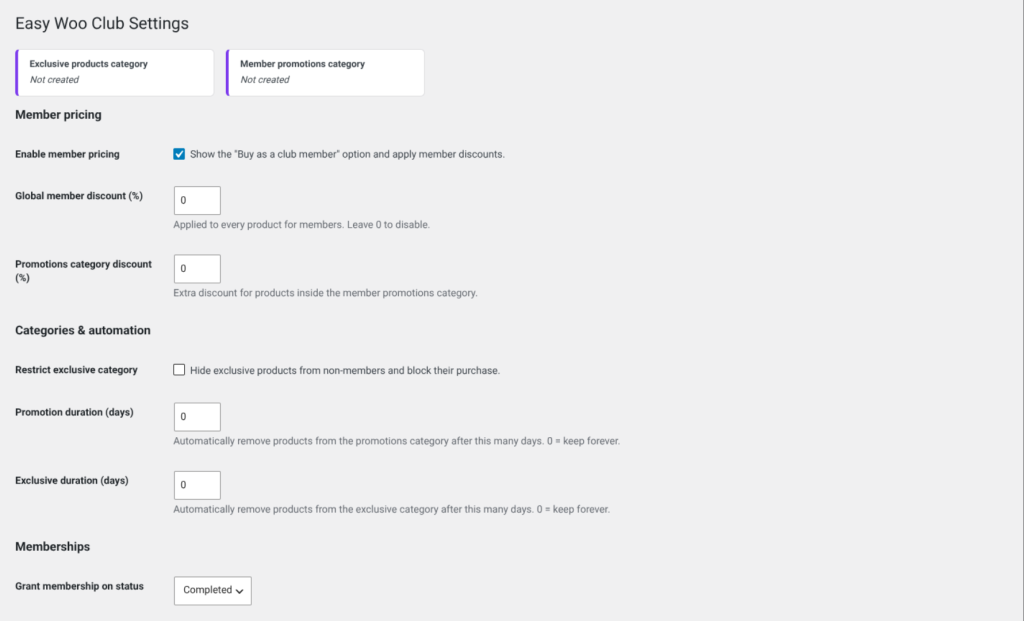
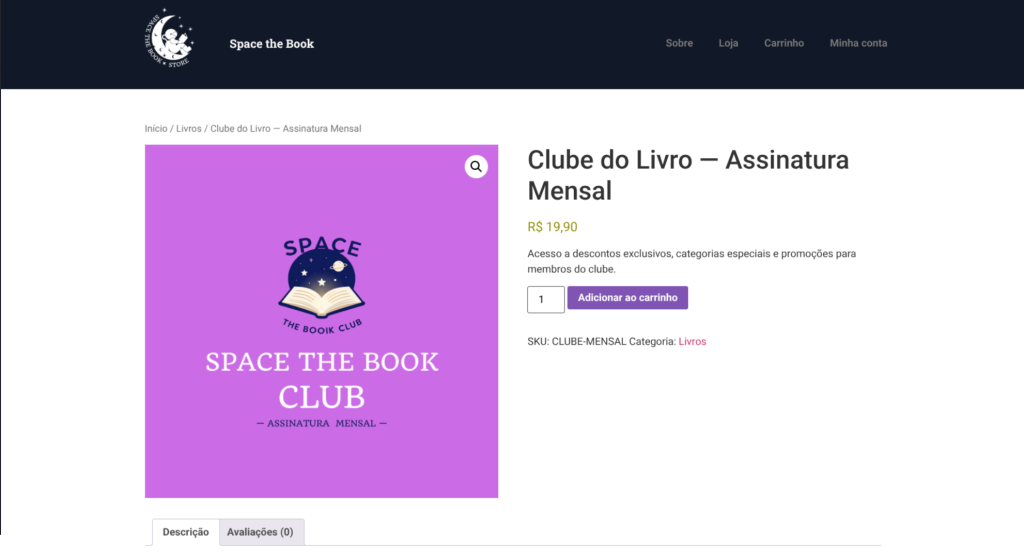
Running a WooCommerce store without a membership program means leaving revenue on the table. You’re forced to offer the same discounts and access to every customer, diluting your margins and missing the opportunity to build a loyal, recurring-revenue community. Manual membership management is a nightmare: tracking expiries, sending reminders, processing renewals, and managing member-only content consumes hours each month. [B] Easy Woo Club solves this completely.
Transform any product into a paid or free membership in seconds. Members automatically unlock exclusive discounts, access to hidden product categories, and time-limited promotional offers—all applied without manual intervention. The plugin handles the entire lifecycle: membership grants, extensions, expirations, renewal reminders, and automatic billing via saved payment methods. Your team stops managing memberships and starts focusing on growing the business.
Whether you’re running a subscription box service, a VIP product club, a professional membership community, or a loyalty program for repeat customers, [B] Easy Woo Club adapts to your model. Set flexible billing periods (monthly, quarterly, biannual, annual, or lifetime), create unlimited discount rules per category or product, and let automation handle the rest. Members toggle their own auto-renewal status from their account dashboard. Non-members are blocked from exclusive content and see a clear path to join.
The plugin integrates seamlessly with WooCommerce’s native cart and checkout—both classic and block-based versions. Shortcodes, Gutenberg blocks, and Elementor widgets let you place membership offers anywhere on your site. The [B] License Manager ensures you receive automatic updates and priority support, with full compliance for HPOS (High-Performance Order Storage) and modern WooCommerce standards.
Renewal billing is the engine that drives recurring revenue. Enable automatic renewal, and the plugin charges members’ saved payment methods a few days before expiry. If a card declines, members receive a one-click payment link by email—no awkward follow-ups needed. Action Scheduler handles all background tasks with native retries, so nothing slips through the cracks. Members stay active, revenue flows predictably, and your support burden drops dramatically.
Stop leaving membership revenue on the table. [B] Easy Woo Club gives you the infrastructure to build a thriving, self-managing membership community inside your store. Activate it today and start capturing recurring revenue from day one.
Forget manual membership management. The plugin handles expiry, renewal, discounts and reminders automatically. Your team focuses on growing, not on admin.
Automatic renewal ensures members keep paying without friction. Saved cards and email payment links keep conversion rates high.
Set up unlimited discounts, membership periods and automation rules without touching a line of code. The intuitive interface means anyone on your team can manage memberships.
Exclusive discounts and access to special products make members feel valued. Automatic renewals keep retention high and churn low.
Works with the classic and block-based cart and checkout, HPOS, Elementor, Gutenberg and every major payment gateway. No conflicts, no surprises.
The [B] license includes support by email and chat, automatic updates and access to new features. Your investment is protected and always up to date.
Create a VIP programme where frequent customers get automatic discounts, access to exclusive products and flash promotions. Automatic renewal keeps revenue predictable.
Sell monthly or quarterly access to curated boxes, services or exclusive content. The plugin handles automatic renewal, expiry reminders and member discounts without manual work.
Build a community of paying members with access to exclusive resources, tools and networks. Members see hidden products and categories, which makes them feel part of a special group.
Launch a "wine club", "coffee club" or "book club" where members get discounts, priority deliveries and access to limited editions. The automatic system scales without manual work.
Sell access to courses, tutorials and exclusive educational content through memberships. Members get discounts on additional courses and access to members-only resources.
Offer memberships for priority support, access to repairs, replacements or extended services. Members enjoy automatic discounts on complementary services.
Upload [B] Easy Woo Club to your WordPress site and activate it. Two categories ("Club Exclusivo" and "Promociones del Club") are created automatically. No manual setup is required.
Edit any product, tick "Club membership" in the Product data box and choose a period (monthly, quarterly, biannual, annual or lifetime). Set the price and you are done.
In Woo Club > Discount rules, add member discounts: global, by category or by product. Specify a percentage or a fixed amount. The plugin automatically applies the biggest discount.
In Woo Club > Settings, turn on "Automatic renewal billing". The plugin will automatically charge the saved payment methods before expiry. Members can turn this off at any time.
Use the shortcode [bdw_easy_woo_club], the "Club Membership" Gutenberg block or the Elementor widget. The card updates automatically to show the member status to existing customers.
Check the Woo Club dashboard to see active members, renewal revenue and applied discounts. Adjust periods, prices and discounts based on performance.
Comparison with common alternatives and generic plugins
| Aspect | Easy Woo Club | Other solutions |
|---|---|---|
| Unlimited member discounts | Yes, global, by category or by product | Only global or limited discounts |
| Automatic renewal with smart retries | Yes, with Action Scheduler and an email fallback | Manual, or requires an additional plugin |
| Exclusive categories hidden automatically | Yes, created and managed automatically | Requires manual setup or additional plugins |
| Gutenberg blocks, shortcode and Elementor widget | Yes, all included in one plugin | Only a shortcode, or requires separate plugins |
| Compatible with the block-based cart and checkout | Yes, automatic injection of the member toggle | Only the classic cart/checkout, or requires manual work |
| Action Scheduler support for reliable background tasks | Yes, with native retries and a WP-CRON fallback | Only WP-CRON, or requires manual setup |
| Support and automatic updates | Yes, via [B] License Manager | Limited support, or requires a separate subscription |
Yes. Set the price of the membership product to 0 and customers become members once the free order is completed. This is perfect for building a member mailing list, offering access to exclusive content at no initial cost or running a membership trial period.
Turn on "Automatic renewal billing" in Woo Club > Settings. A few days before expiry (configurable), the plugin creates a renewal order and charges the member's saved payment method offline. This requires a payment gateway that supports tokenisation (saved cards), and the member must have saved a payment method when they joined. If the automatic charge cannot be completed, the member receives a one-click payment link by email so the renewal is effortless. Gateway-specific integrations can hook into the bdw_ewc_pre_charge_renewal and bdw_ewc_charge_renewal_result filters. Members can turn automatic renewal off at any time from their account area.
Yes. Use the shortcode [bdw_easy_woo_club] anywhere (attributes: product_id, title, subtitle, button_text, button_color, text_color, align, show_price, show_status). In the block editor, add the "Club Membership" block (Baqueiro category) with live preview and visual controls. Elementor users get a matching "Club Membership" widget. All three share the same markup, and the card automatically shows a "manage membership" state to existing members.
Active members can turn on the "Buy as a club member" option in the cart or checkout. The member discount rules and the promotions category discount are applied automatically, using the biggest discount that matches each product. The plugin evaluates every applicable discount (global, by category, by product) and applies the one that is most beneficial for the customer.
Add products to the "Promociones del Club" category. A daily task removes them automatically after the number of days set in Settings, and a countdown is shown on the badge. This lets you create flash promotion campaigns without manual work: set the period, add products and the plugin handles the automatic clean-up.
Yes, fully compatible. The plugin automatically injects the member toggle into the cart and checkout blocks, so it works smoothly with stores that use High-Performance Order Storage (HPOS) and the latest WooCommerce block architecture.
When the expiry date is reached, the membership status changes automatically to "expired". The member loses access to the discounts and exclusive products, but can renew at any time from their account area or by clicking the renewal link in the reminder email. If automatic renewal is turned on and the charge succeeds, the membership is extended automatically without the member having to do anything.
Yes. You can create as many membership products as you need, with different periods, prices and discounts. However, a customer can only have one active membership at a time. If they buy a second membership, the first one is replaced. This guarantees clear management of the member status and avoids discount conflicts.
The plugin works with any WooCommerce payment gateway that supports tokenisation (saving cards), such as Stripe, PayPal, Square and others. For automatic renewal, the member must save a payment method during the initial purchase. If the automatic charge fails, the plugin sends a one-click payment link so the member can renew by hand.
Automatic renewal requires that: (1) the member saved a payment method during the initial purchase, (2) the payment gateway supports offline charges (tokenisation), and (3) automatic renewal is turned on in the plugin settings. Members can turn automatic renewal off at any time from My Account. If an automatic charge cannot be completed, a payment link is sent by email as an alternative.
[ Keep exploring ]
WooCommerce
Keep out-of-stock products visible and capture direct requests
License From €29/year
WooCommerce
Manage thousands of WooCommerce products without timeouts or interruptions
No cost Free
WooCommerce
Excel for WooCommerce. Fast, secure, no size limits.
License From €29/year