No timeouts or interruptions
Processes thousands of products in small AJAX-driven batches. No request hits the PHP maximum execution time, even with huge catalogues.

[ WooCommerce ]
Manage thousands of WooCommerce products without timeouts or interruptions
Works with WooCommerce
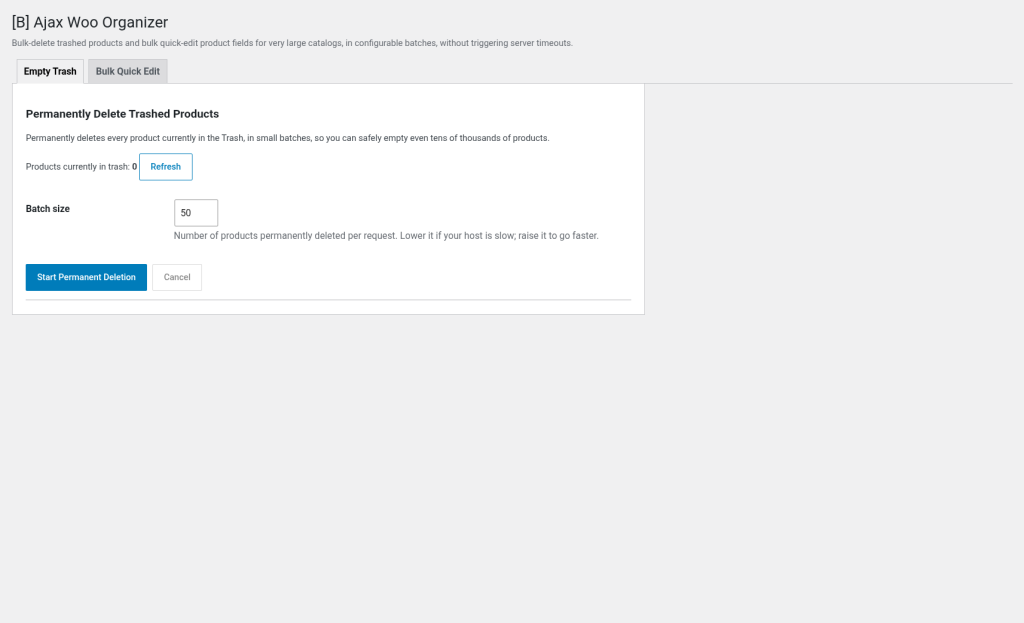
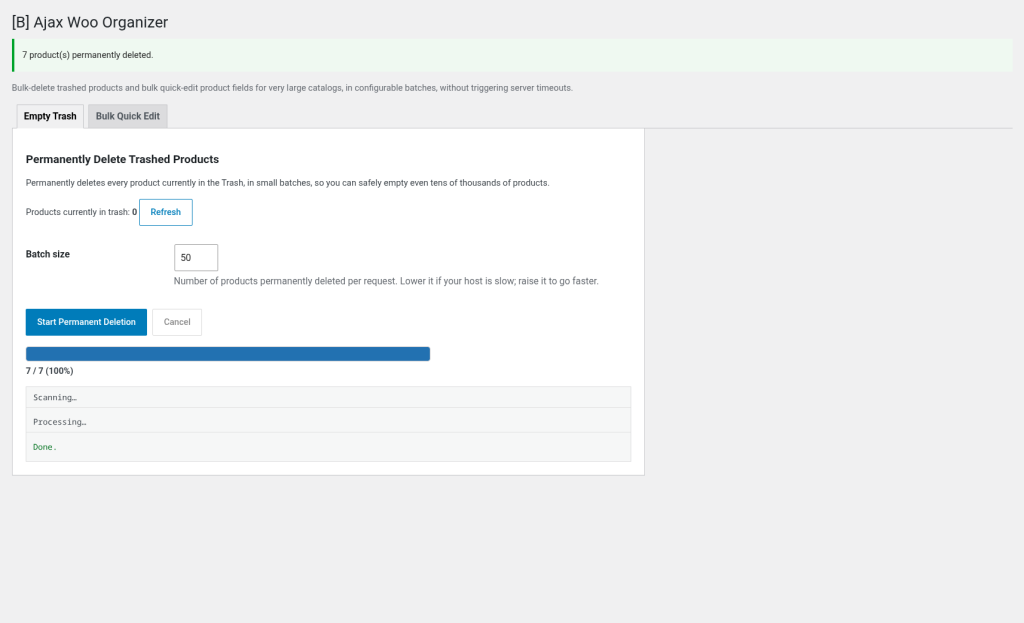
If you run a WooCommerce store with thousands of products, you know bulk operations can be a nightmare. Standard editors freeze, the server hits its maximum execution time, and you’re left with half-finished changes. [B] Ajax Woo Organizer solves this problem at the root: it processes your massive catalogs in small, configurable batches driven by AJAX, so nothing ever locks up.
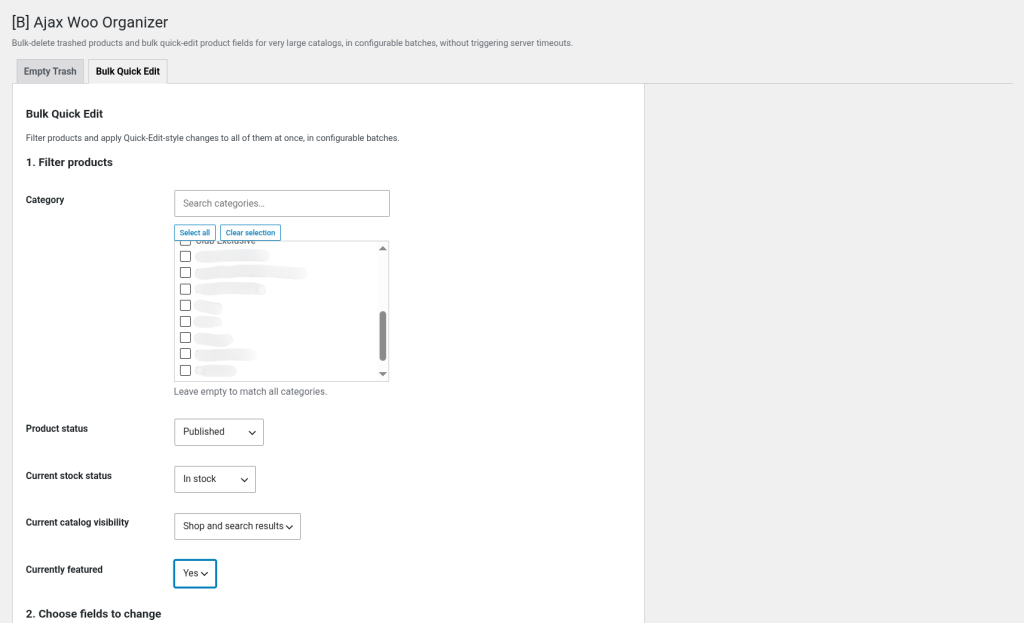
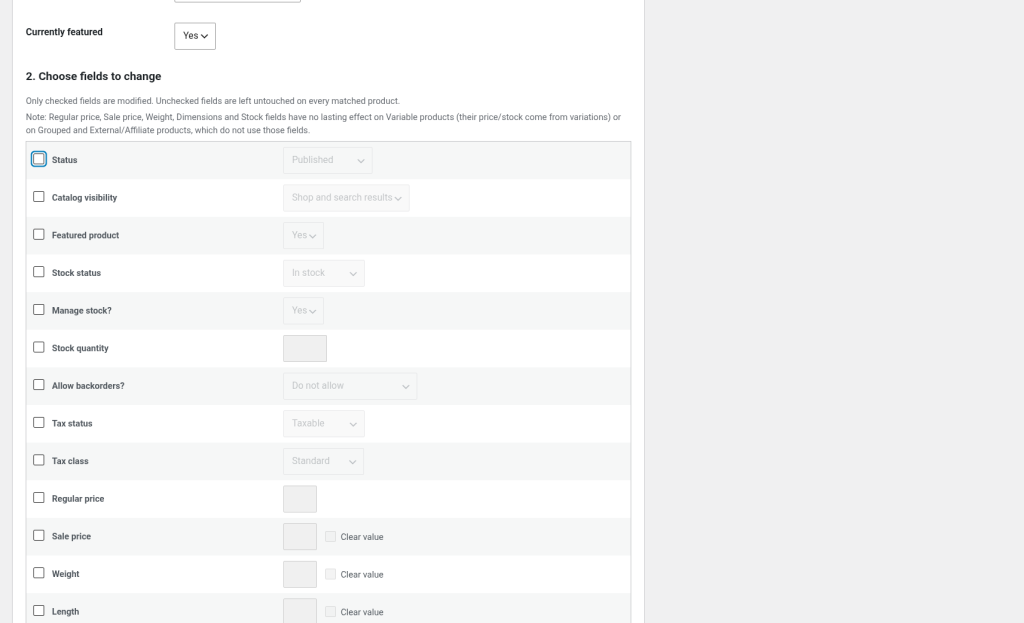
The plugin adds a single admin screen (WooCommerce → Ajax Woo Organizer) with two powerful tools. The first, Empty Trash, identifies all deleted products, scans their IDs once, and then permanently deletes them in small batches via AJAX, with a live progress bar. The second, Bulk Quick Edit, lets you filter products by category, status, catalog visibility, or featured status, and then apply changes (status, visibility, featured, stock, price, taxes, shipping, dimensions, and more) to thousands of products at once, also in safe batches.
Both tools are ideal for owners of medium to large stores, agencies managing multiple catalogs, importers who need to reorganize products in bulk, and dropshipping operators who update prices and stock at scale. If you’ve ever lost changes because the server timed out, or had to make manual updates because the standard tools didn’t scale, this plugin will save you hours of work and frustration.
The architecture is designed for reliability: the plugin scans once (a fast, lightweight query) and then lets the browser drive a loop of small AJAX requests. Each batch processes only 50–200 products (configurable), ensuring no request runs long enough to hit the PHP limit. You can cancel at any time; items already processed stay processed, and you simply run it again to pick up where you left off.
The plugin is fully compatible with WordPress 6.0+, PHP 8.1+, and WooCommerce 6.0–9.4. There are no hidden dependencies or complex settings. Install, activate, and go straight to WooCommerce → Ajax Woo Organizer. The user interface is clear: readable filters, labeled checkboxes, a confirmation dialog that shows exactly what will change and how many products are affected, and an execution log that captures any per-product errors.
Since version 1.1.0, the plugin includes a completely redesigned interface: a searchable category selector, a richer confirmation dialog that lists the fields that will change and their new values, loading indicators during scanning and processing, and success/error banners when finished. Accessibility is also a priority: proper ARIA roles, a live counter of selected fields, and a safe confirmation flow that shows the real product count before touching any data.
It’s not just a cleanup tool; it’s an operational solution that reduces manual workload, improves the customer experience (cleaner catalogs, correct prices, accurate stock), and gives you the confidence that you can reorganize and update your catalog without fear of losing changes or breaking your store. If your WooCommerce needs to grow without friction, [B] Ajax Woo Organizer is the companion you’ve been looking for.
Processes thousands of products in small AJAX-driven batches. No request hits the PHP maximum execution time, even with huge catalogues.
Confirm exactly which fields will change and how many products will be affected before running. Live progress bar, detailed log and a Cancel button at any time.
Update prices, stock, tax, shipping and more for thousands of products in minutes, not hours. Reduces manual work and operational friction.
Items already processed stay processed even if the job is interrupted. No corrupted data, no incomplete operations, no surprises.
Whether you have 500 or 50,000 products, the batch architecture guarantees predictable performance. Configurable batches adapt to your server.
Cleaner catalogues, accurate prices, correct stock and consistent visibility. Customers see a well-organised, trustworthy store.
Owners of stores with catalogues of 5,000+ products who need to update prices, stock and tax regularly without losing changes to timeouts.
Manage several client stores. Reorganise catalogues after migrations, update settings in bulk and clean databases without custom tools.
Update supplier prices and stock at scale. Sync catalogue visibility and status changes without interruptions or manual work.
Delete discontinued products in bulk, reorganise categories, adjust visibility and make structural changes without breaking your store.
After importing products, sync fields from several sources, normalise prices and apply tax/shipping changes to your whole database.
Download the ZIP file from your Baqueiro account or upload it directly via Plugins → Add New → Upload Plugin. Activate it from the Plugins screen.
Go to WooCommerce → Ajax Woo Organizer in the admin dashboard. You will see two tabs: Empty trash and Bulk quick edit.
For Empty trash, just click Scan. For Quick edit, select categories, status and other filters, tick the fields you want to change, enter the new values and click Scan.
The confirmation dialog shows exactly what will change and how many products will be affected. If everything is correct, click Run. The progress bar shows the progress in real time.
When it finishes, you will see a summary of the changes and any error captured. The products already processed stay processed. If needed, you can run it again to continue or make adjustments.
How we compare with the standard alternatives
| Aspect | Ajax Woo Organizer | Other solutions |
|---|---|---|
| Processes thousands of products without timeouts | Yes, through configurable AJAX batches | No, a single request times out with large catalogues |
| Empties the product trash in bulk | Yes, automatic and safe, with confirmation | Requires manual deletion or custom scripts |
| Granular filters (category, status, visibility, featured, stock) | All included, with a category selector with search | Only basic filters, or requires custom code |
| Fields editable in bulk | 13+: status, visibility, price, stock, tax, shipping, dimensions, etc. | Usually fewer than 8, often without shipping or dimensions |
| Live progress bar and cancellation | Yes, with a detailed error log | No real-time feedback, hard to cancel |
| Smart confirmation before running | Yes, shows exactly what will change and how many products will be affected | Generic confirmation or none |
| Support in Spanish and by email/chat | Yes, Spanish team available 9:00–18:00 CET | Usually English only, limited documentation |
The standard WooCommerce bulk editor processes every change in a single PHP request, which hits the maximum execution time with thousands of products. [B] Ajax Woo Organizer splits the work into small batches driven by AJAX from the browser, ensuring that no request runs long enough to cause a timeout. It also offers more editable fields and more granular filters.
The Bulk quick edit tool works on parent products (simple and variable), mirroring the scope of the standard WooCommerce Quick Edit. Variations are not targeted individually. However, changes to a variable product (such as price or stock) may propagate to the variations depending on your WooCommerce settings.
The batch loop is driven by the browser, so closing the tab stops the loop. The items already processed stay processed. Simply reopen the tool and start again: the trash tool will find fewer trashed products, and the bulk edit tool will scan again and only match products that still meet the filters. There is no corrupted data and no incomplete operation.
No. The Bulk quick edit tool only touches products that match exactly the filters you set (category, status, visibility, etc.) and only changes the fields you explicitly tick. Everything else stays untouched. The Empty trash tool only deletes products that are already in the trash.
The default batch size is 100 products per AJAX request, which works well on most servers. If your server is weak or your products have heavy logic (many variations, custom meta, hooks), try 50. If your server is robust, 200 is safe. You can adjust it at any time without reconfiguring anything else.
The Empty trash tool deletes products permanently; this cannot be undone. Always keep a database backup before running large deletions. The Bulk quick edit tool changes specific fields; you can edit those fields again if needed, but the plugin does not keep a rollback history. Consider making a backup before important bulk changes.
Yes, the plugin is fully compatible with WordPress Multisite. Each site in the network has its own instance of the plugin with its own tools and settings. Operations on one site do not affect the other sites of the network.
The plugin captures errors per product in the run log. If a product fails (for example, because of a custom hook that rejects the change), that product is skipped and the job continues with the next one. The log shows exactly which product failed and why, so you can investigate and retry if needed. The products processed before the error stay processed.
[ Keep exploring ]
WooCommerce
Keep out-of-stock products visible and capture direct requests
License From €29/year
WooCommerce
Excel for WooCommerce. Fast, secure, no size limits.
License From €29/year
WooCommerce
Automatic tax ID validation for your Spanish checkout
License From €29/year